
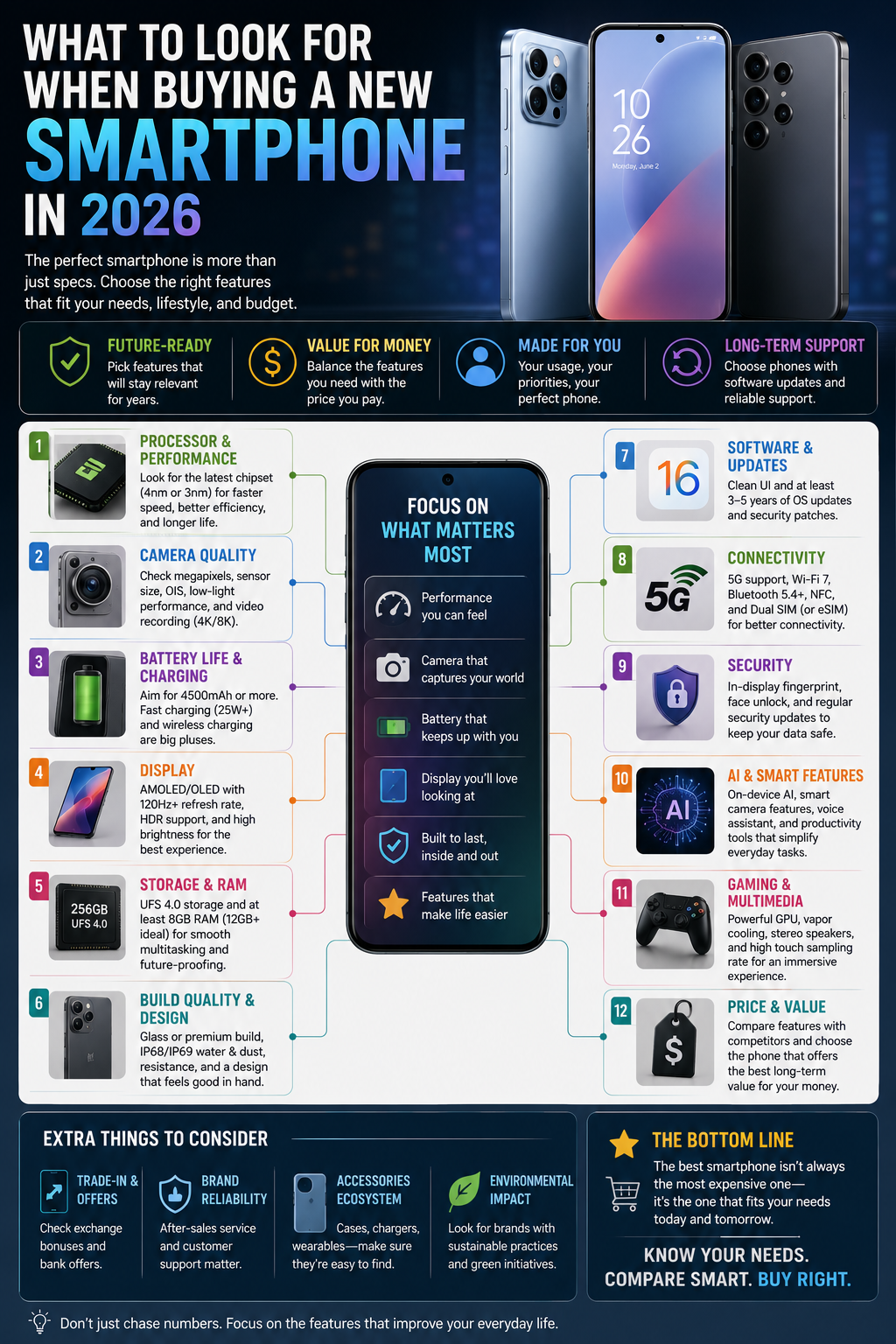
Buying a new smartphone in 2026 means facing dozens of models, each promising faster chips, better cameras, and brighter screens than the last. The specifications sheets alone can be overwhelming, especially when marketing language tends to emphasize numbers rather than what those numbers actually mean for daily use.
The truth is that no single phone is right for everyone. A mobile gamer has different priorities than a student on a tight budget, and a photography enthusiast cares about different specifications than someone who mainly uses their phone for calls, messaging, and browsing. This guide breaks down the specifications and features that genuinely matter, explains them in plain language, and helps you match them to your actual needs rather than chasing the longest spec sheet.
Display
The display is the part of your phone you interact with the most, so it’s worth understanding what the specifications actually mean.
Screen Size
Larger screens make video, browsing, and gaming more comfortable, but they also make one-handed use harder and increase the phone’s overall size and weight. Smaller screens are easier to handle but can feel cramped for media consumption or multitasking.
OLED/AMOLED vs. LCD
OLED and AMOLED panels can turn off individual pixels, which produces deeper blacks and generally better contrast. LCD panels use a backlight behind the entire screen, which typically results in less precise contrast but can still look good for everyday use. Most phones in the mid-range and above now use OLED or AMOLED panels.
Refresh Rate
Refresh rate, measured in Hz, describes how many times per second the screen updates. Higher refresh rates, such as 90Hz or 120Hz, make scrolling and animations appear smoother. The difference is noticeable for many people but not something everyone prioritizes equally.
Resolution
Resolution refers to how many pixels make up the display. Higher resolution means sharper detail, but on smaller screens, the difference between resolution tiers becomes harder to notice at normal viewing distances.
Brightness and Outdoor Visibility
Peak brightness, usually listed in nits, affects how visible your screen is in direct sunlight. This matters more for people who frequently use their phone outdoors and less for those who mostly use it indoors.
When Premium Display Features Are Actually Useful
High refresh rates and peak brightness matter most for people who game, watch a lot of video, or spend significant time outdoors. If your phone use is mostly text-based — messaging, email, basic browsing — these features offer a smaller practical benefit relative to their cost [Internal Link: Phones].
Performance
Performance specifications are often the most heavily marketed, but they aren’t always the most important factor for everyday use.
Smartphone Processors
The processor, or chipset, handles the phone’s core computing tasks. Newer and higher-tier processors generally offer better performance and efficiency, but the practical difference between a flagship chip and a solid mid-range chip is often smaller than the marketing suggests for typical daily tasks.
RAM
RAM affects how many apps and processes your phone can keep active at once without reloading them. More RAM can help with multitasking and keeping apps running in the background, though the benefit varies depending on how the phone’s software manages memory.
Everyday Performance
For tasks like messaging, browsing, and social media, most modern phones — even mid-range ones — perform smoothly. The biggest differences show up in more demanding tasks.
Gaming Performance
Mobile gaming, especially with graphically demanding titles, benefits from stronger processors and more RAM. If you play resource-intensive games regularly, this is one area where investing in higher-tier specifications tends to pay off [Internal Link: AI & Tech].
Multitasking
Heavy multitaskers who frequently switch between several apps, especially on larger-screen phones, benefit from more RAM and a capable processor that keeps apps loaded in the background.
Why Benchmark Numbers Should Not Be the Only Buying Factor
Benchmark scores measure performance under specific test conditions, which don’t always reflect real-world use. A phone with a lower benchmark score can still feel smooth and responsive for typical daily tasks, while chasing the highest benchmark number often means paying for performance headroom many users won’t fully use.
Battery Life and Charging
Battery performance is one of the most practical factors in daily smartphone use.
Battery Capacity
Battery capacity, measured in mAh, gives a general sense of how much energy a phone can store, but it doesn’t tell the whole story on its own.
Real-World Battery Life
Actual battery life depends on the display, processor efficiency, software optimization, and how the phone is used. Two phones with similar battery capacities can offer noticeably different real-world battery life.
Fast Charging
Fast charging reduces the time it takes to recharge your phone, which is useful for people who need a quick top-up during the day. Charging speeds vary significantly between models and depend on both the phone and the charger used.
Wireless Charging
Wireless charging offers convenience by removing the need to plug in a cable, though it’s generally slower than wired fast charging. It’s worth checking whether a phone supports common wireless charging standards if this feature matters to you.
What Affects Battery Life
Screen brightness and refresh rate, background app activity, network signal strength, and overall software optimization all influence how long a battery lasts between charges, often more than raw battery capacity alone.
Camera
Camera quality is one of the most talked-about smartphone features, but understanding the components helps set realistic expectations.
Main Camera
The main camera handles most everyday photography and is usually the most capable sensor on the phone.
Ultrawide Camera
An ultrawide camera captures a broader field of view, useful for landscapes, group photos, or tight indoor spaces, though image quality is often slightly lower than the main camera.
Telephoto Camera
A telephoto camera enables optical or hybrid zoom, useful for photographing distant subjects with less quality loss than digital zoom alone.
Megapixels
Higher megapixel counts allow for more detail and cropping flexibility, but megapixels alone don’t determine photo quality. Sensor size, lens quality, and image processing all play significant roles.
Optical Image Stabilization
Optical image stabilization helps reduce blur from hand movement, particularly useful in low light or when recording video.
Low-Light Photography
Low-light performance depends on sensor size, aperture, and image processing rather than megapixel count. This is an area where real-world sample photos are often more informative than spec sheets [Internal Link: Reviews].
Video Recording
Video capabilities include resolution, frame rate, and stabilization quality. If video is a priority, it’s worth researching stabilization performance specifically, since it varies more between phones than resolution does.
Why More Cameras Do Not Automatically Mean Better Photography
A phone with three or four rear cameras isn’t automatically better than one with fewer. What matters is the quality of each individual camera and how well the software processes images, not simply the total camera count.
Software and Updates
Software affects your day-to-day experience just as much as hardware, and it’s an area that’s easy to overlook.
Android/iOS
The two major mobile operating systems offer different design philosophies, app ecosystems, and customization levels. Choosing between them often comes down to personal preference and familiarity, as well as compatibility with devices you already own.
Software Experience
Beyond the core operating system, manufacturers add their own interface layers and features. Some are lightweight and close to stock software, while others include more customization and pre-installed apps.
Security Updates
Regular security updates patch vulnerabilities and are important for protecting your personal data over time, regardless of which operating system you use.
Major OS Updates
Major operating system updates bring new features and continued compatibility with newer apps. Manufacturers vary significantly in how many years of major updates they commit to providing.
Long-Term Usability
A phone with strong update support tends to remain secure and functional for longer, which matters most for buyers who plan to keep their phone for several years [Internal Link: Buying Guides].
Why Update Support Matters When Buying a Phone
A phone with excellent hardware but limited software support may become outdated or insecure well before the hardware itself would otherwise need replacing. Checking a manufacturer’s update policy is a practical step that’s easy to skip but worth doing.
Storage
Storage needs vary widely depending on how you use your phone.
128GB
128GB is generally sufficient for users with moderate app usage and photo libraries, especially if they rely on cloud storage or streaming services rather than storing large amounts of media locally.
256GB
256GB offers more comfortable headroom for users with larger photo and video libraries, more installed apps and games, or offline media.
512GB
512GB and above suits users who record a lot of video, download offline content frequently, or simply prefer not to manage storage space actively.
Cloud Storage
Cloud storage services can reduce the need for large local storage by keeping photos, videos, and files accessible online rather than on the device itself, though this depends on a reliable internet connection.
Expandable Storage Where Available
Some phones support expandable storage through a memory card, though this feature has become less common on many modern devices. It’s worth checking whether a specific model supports it if expandable storage matters to you.
Which Storage Size Makes Sense for Different Users
Light users focused on messaging and browsing can often manage comfortably with lower storage tiers, while heavy media users, mobile gamers, and those who don’t want to rely on cloud storage generally benefit from higher storage capacities.
Build Quality and Durability
Build quality affects both how a phone feels day to day and how well it holds up over time.
Materials
Phones use a mix of materials, including glass, aluminum, and various plastics, each with different trade-offs in weight, durability, and cost.
Water and Dust Resistance
Water and dust resistance ratings, typically shown as an IP rating, indicate how well a phone withstands exposure to moisture and particles. Higher ratings offer more protection, though no rating guarantees complete protection in all conditions.
Screen Protection
Reinforced glass technologies help resist scratches and reduce the likelihood of cracks from drops, though protective cases and screen protectors still provide meaningful additional protection.
Repairability
Some phones are easier and more affordable to repair than others, which can affect long-term ownership costs if a screen or battery needs replacing.
Cases and Screen Protectors
A quality case and screen protector are inexpensive ways to meaningfully extend a phone’s lifespan and protect your investment, regardless of how durable the phone is on its own [Internal Link: Accessories].
Connectivity
Connectivity features affect how your phone communicates with networks and other devices.
5G
5G offers faster mobile data speeds and lower latency compared to older networks, though actual performance depends heavily on carrier coverage in your specific area.
Wi-Fi
Newer Wi-Fi standards can offer faster speeds and better performance in crowded network environments, though benefits depend on having a compatible router.
Bluetooth
Bluetooth version affects connection stability and, in some cases, audio quality when paired with wireless headphones or other accessories.
NFC
NFC enables contactless payments and quick pairing with certain accessories, and it’s worth confirming a phone includes it if you plan to use contactless payment services.
USB-C
USB-C has become the standard charging and data port across most modern smartphones, offering more consistent cross-device compatibility than older connector types.
Dual SIM/eSIM
Dual SIM or eSIM support allows using two phone numbers or plans on a single device, useful for travelers or anyone separating personal and work lines.
Price and Value
Choosing a smartphone isn’t simply about finding the cheapest or most expensive option available. It’s about comparing what each phone offers against what you’ll actually use.
A lower-priced phone that comfortably handles your daily tasks can offer better value than a flagship model with capabilities you won’t take advantage of. Conversely, an inexpensive phone that struggles with basic multitasking or has poor update support may end up costing more in frustration or an earlier replacement.
When comparing value, weigh the display, performance, camera, software support, and build quality together, rather than focusing on a single standout specification [Internal Link: Comparisons].
What Smartphone Should You Buy?
Different users have different priorities. Here’s how to think about your own needs.
Budget-conscious users should prioritize reliable everyday performance and reasonable software update support over premium display or camera features.
Students often benefit from a balance of battery life, durability, and enough storage for coursework, apps, and media, without necessarily needing flagship-level performance.
Everyday users who mainly message, browse, and use social media are usually well served by mid-range phones, which now offer strong performance for typical tasks.
Mobile gamers should prioritize a capable processor, sufficient RAM, and a high refresh rate display, since these directly affect gaming performance and smoothness.
Photography-focused users should research camera quality closely, including low-light performance and stabilization, rather than relying on megapixel counts or camera count alone.
Heavy multitaskers benefit from more RAM and a larger display, which make switching between apps and managing multiple tasks more comfortable.
People who keep phones for several years should prioritize software update support and build quality, since these factors most affect how well a phone holds up over a longer ownership period [Internal Link: Best Picks].
Common Smartphone Buying Mistakes
- Focusing only on megapixel counts instead of overall camera quality, including sensor size and image processing.
- Ignoring software update policies, which can significantly shorten a phone’s useful lifespan.
- Choosing based on benchmark scores alone, without considering real-world performance for your actual use case.
- Overbuying storage or performance you won’t realistically use, paying for headroom that goes unused.
- Underestimating storage needs, particularly for users who record video or download offline content regularly.
- Skipping research on battery life, relying only on battery capacity numbers without considering real-world usage patterns.
- Not checking connectivity features, such as 5G band support or NFC, that matter for your specific carrier or payment habits.
- Buying based on brand reputation alone, without comparing the specific model’s actual specifications and reviews.
A Simple Smartphone Buying Checklist
- Does the display size and type fit how you use your phone day to day?
- Does the processor and RAM match your performance needs, including gaming if relevant?
- Is the battery life and charging speed sufficient for your daily routine?
- Does the camera system fit your photography and video priorities?
- Does the manufacturer offer sufficient software update support for how long you plan to keep the phone?
- Is the storage capacity appropriate for your media and app usage?
- Does the build quality and durability rating match how you’ll use and carry the phone?
- Does the phone support the connectivity features you rely on, such as 5G, NFC, or dual SIM?
- Have you compared overall value across a few models rather than focusing on a single specification?
Frequently Asked Questions
Is a higher refresh rate always worth paying extra for? It depends on your usage. Gamers and heavy media users tend to notice and appreciate higher refresh rates, while users focused on messaging and browsing may not find it as significant a factor.
Do more cameras always mean better photos? No. Camera quality depends on sensor size, lens quality, and image processing, not simply the number of cameras on the back of the phone.
How much storage do I actually need? It depends on your habits. Users who rely on cloud storage and don’t download much offline content can often manage with lower storage tiers, while those who record video or keep large media libraries locally benefit from higher capacities.
Does a higher megapixel count mean a better camera? Not necessarily. Megapixels affect detail and cropping flexibility, but low-light performance, stabilization, and image processing often matter more for overall photo quality.
How important are software updates when choosing a phone? Very important for long-term use. A phone with strong update support stays secure and compatible with newer apps for longer, which affects how long the phone remains genuinely usable.
Should I prioritize battery capacity or real-world battery life? Real-world battery life is more useful, since it reflects how the display, processor, and software work together, rather than just how large the battery is.
Is 5G necessary for everyone? It depends on your carrier’s coverage and your data usage habits. 5G offers faster speeds where supported, but the benefit varies significantly by location.
Is it worth buying a flagship phone if I only use basic apps? Not necessarily. Mid-range phones now handle everyday tasks like messaging, browsing, and social media smoothly, so a flagship’s extra performance may go largely unused for basic use cases.
Comparison Table: Key Smartphone Features
| Feature | What to Look For | Most Important For |
|---|---|---|
| Display | Panel type, refresh rate, brightness suited to your usage | Gamers, media viewers, outdoor users |
| Processor | Performance tier matched to your actual tasks | Gamers, heavy multitaskers |
| RAM | Sufficient capacity for your multitasking habits | Heavy multitaskers, gamers |
| Battery | Real-world battery life, not just capacity | Heavy daily users, travelers |
| Charging | Fast charging and wireless charging support | Users needing quick top-ups |
| Camera | Sensor quality, stabilization, low-light performance | Photography-focused users |
| Storage | Capacity matched to media and app usage | Heavy media users, gamers |
| Software Updates | Length and consistency of update support | Long-term owners |
| Connectivity | 5G, NFC, and dual SIM/eSIM support as needed | Travelers, payment app users |
| Durability | Water/dust resistance and build materials | Active users, long-term owners |
Conclusion
Choosing a smartphone in 2026 doesn’t require memorizing every specification on a comparison chart. It requires understanding which specifications actually affect how you use your phone day to day, and prioritizing those over marketing language or the longest feature list.
Gadget Hacks – A decision-framework guide that walks through carrier compatibility, platform choice, total cost of ownership, and software longevity before hardware specs even enter the picture, including real Consumer Reports durability and battery test data. Click here to open the guide.
TechEngage – A practical breakdown of what to weigh based on how you actually use your phone, covering chipset tiers, RAM needs, camera sensor size versus megapixels, and realistic software-update timelines by brand. Click here to open the guide.
Bright Coding – A features-first checklist covering realistic software-update commitments, on-device AI and privacy, charging speed trade-offs, and when satellite messaging is actually worth paying for. Click here to open the guide.