
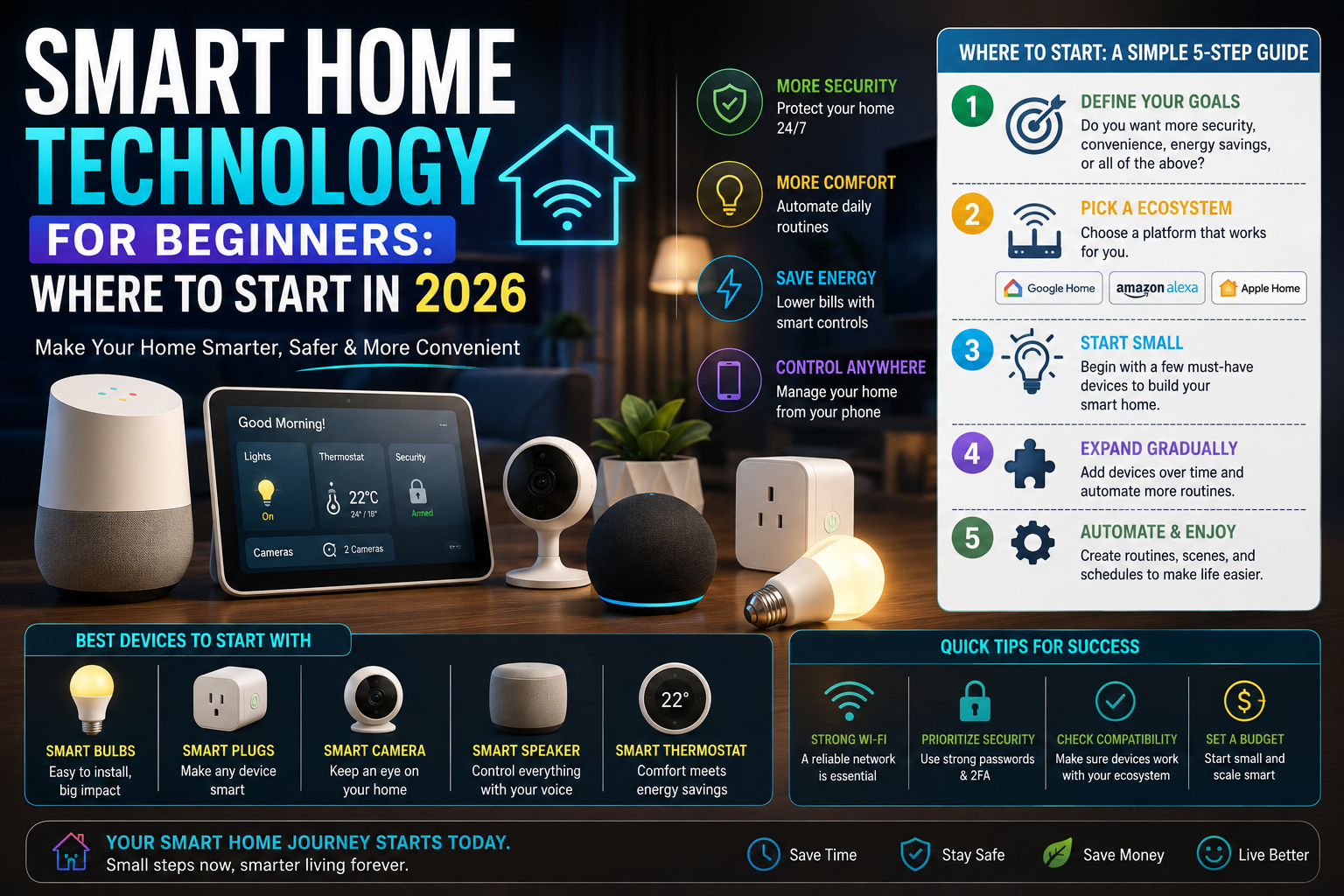
The concept of a connected household has transformed rapidly over recent years. What once required complex wiring, custom programming, and substantial financial investment has evolved into a consumer-friendly ecosystem of accessible devices. Today, smart home technology allows ordinary households to automate daily routines, enhance energy management, and monitor home security from anywhere in the world.
However, the sheer volume of available options can overwhelm newcomers. Advertisements often depict futuristic homes where every light, appliance, and door lock operates seamlessly by voice or automated routines. In reality, building a functional connected home does not require automating every room at once. For beginners, the secret to success lies in starting small, choosing compatible hardware, and solving actual everyday inconveniences rather than chasing complexity.
For more insights into connected living spaces, explore our [Internal Link: Smart Home] and [Internal Link: Buying Guides].
1. What Is a Smart Home?
At its core, a smart home is a living space where electronic devices are connected to a home network, allowing them to communicate, share data, and be controlled remotely or automatically. Instead of relying purely on physical switches or standalone remotes, smart devices can be managed via smartphone applications, voice assistants, or pre-programmed schedules.
These devices communicate using several common wireless and wired protocols:
- Wi-Fi: Connects devices directly to your home internet router, making it ideal for devices that transmit heavy data, such as security cameras.
- Bluetooth: Used for short-range communication, often during the initial setup phase or for accessories like smart locks.
- Matter: A universal connectivity standard designed to let smart devices from different manufacturers work together seamlessly across multiple platforms.
- Thread: A low-power, secure mesh networking technology that helps connected devices communicate rapidly and reliably without overloading your home Wi-Fi network.
Understanding these protocols helps ensure that your chosen devices work harmoniously together.
2. The Most Useful Smart Home Devices
Before purchasing hardware, it helps to understand what individual smart home devices do, why people use them, and what limitations to keep in mind.
Smart Lights
- What it does: Replaces traditional bulbs or light switches to allow remote dimming, color adjustments, and scheduling.
- Why buy it: Offers effortless ambiance control and automated lighting schedules to simulate occupancy while traveling.
- Important features: Brightness levels, color temperature tunability, and app or voice responsiveness.
- Who it is for: Anyone looking for an immediate, noticeable upgrade to home atmosphere.
- Potential disadvantage: Can become expensive if replacing bulbs throughout an entire multi-room home.
Smart Plugs
- What it does: Plugs into a standard wall outlet, turning any ordinary plugged-in appliance (like a lamp or fan) into a connected device.
- Why buy it: Provides an inexpensive way to automate non-smart electronics.
- Important features: Energy monitoring, physical power buttons, and compact designs that do not block adjacent outlets.
- Who it is for: Budget-conscious beginners wanting to test automation without replacing existing gear.
- Potential disadvantage: Only works with devices that feature manual physical switches left in the “on” position.
Smart Speakers and Displays
- What it does: Acts as an audio hub or visual screen that responds to voice commands and controls other connected hardware.
- Why buy it: Provides centralized voice control and quick access to music, timers, and smart home dashboards.
- Important features: Audio clarity, microphone sensitivity, and screen resolution (for smart displays).
- Who it is for: Households wanting hands-free control and centralized media playback.
- Potential disadvantage: Raises privacy questions regarding microphone activation and voice data collection.
Smart Thermostats
- What it does: Replaces traditional climate controllers to learn heating and cooling preferences or follow automated schedules.
- Why buy it: Improves home comfort and can lower energy bills by reducing heating or cooling in empty rooms.
- Important features: Compatibility with existing HVAC wiring, scheduling interfaces, and remote temperature sensors.
- Who it is for: Homeowners looking to optimize energy usage and indoor comfort.
- Potential disadvantage: Requires careful wiring checks prior to installation.
Smart Cameras
- What it does: Monitors indoor or outdoor spaces and streams live video to your smartphone.
- Why buy it: Offers peace of mind and visual check-ins while away from home.
- Important features: Resolution clarity, night vision, field of view, and motion detection zones.
- Who it is for: People seeking enhanced visual awareness around their property.
- Potential disadvantage: Often requires paid cloud subscriptions to access historical video footage history.
Video Doorbells
- What it does: Replaces a standard doorbell with a camera, microphone, and speaker system that alerts your phone when visitors arrive.
- Why buy it: Lets you see and converse with package delivery drivers or visitors from anywhere.
- Important features: Two-way audio quality, package detection, and power options (battery vs. hardwired).
- Who it is for: Frequent online shoppers and residents wanting front-door visibility.
- Potential disadvantage: Battery-powered models require periodic recharging, while hardwired setups require existing doorbell wiring.
Smart Locks
- What it does: Replaces traditional door deadbolts with keypad, smartphone, or biometric entry mechanisms.
- Why buy it: Eliminates the need to carry physical keys and allows remote guest access provisioning.
- Important features: Auto-lock timers, physical key backup, and activity logs.
- Who it is for: Busy households, rental property managers, or frequent travelers.
- Potential disadvantage: Mechanical installation alignment can be finicky on older doors.
Smart Sensors
- What it does: Detects motion, door/window openings, water leaks, or temperature changes.
- Why buy it: Triggers automated actions, such as turning on lights when a door opens or alerting you to pipe leaks.
- Important features: Battery life, wireless range, and compact form factor.
- Who it is for: Users wanting advanced automation and proactive home monitoring.
- Potential disadvantage: Requires a compatible hub or gateway to function properly.
Robot Vacuums
- What it does: Autonomously navigates and cleans floors on a scheduled basis.
- Why buy it: Saves considerable time on routine floor maintenance.
- Important features: Mapping technology, obstacle avoidance, self-emptying bins, and mopping capabilities.
- Who it is for: Busy professionals, families, and pet owners.
- Potential disadvantage: High upfront cost and regular brush maintenance requirements.
For guidance on comparing peripherals, visit our [Internal Link: Comparisons] and [Internal Link: Accessories].
3. Start With Smart Lighting
For most beginners, smart lighting represents the ideal entry point. Unlike complex security systems or HVAC upgrades, smart bulbs or smart switches require minimal technical know-how to install.
Smart lighting allows you to set automated schedules so that lights turn on at sunset or fade out gradually at bedtime. You can control brightness levels from your phone or dim lights using voice commands without getting up from the couch. While multi-color bulbs offer playful customization, simple white-tuning bulbs provide practical day-to-day utility at a lower cost.
4. Smart Plugs
If you want to experience home automation without replacing your existing electronics, smart plugs offer a cost-effective solution. By plugging a standard lamp, fan, or coffee maker into a smart plug, you instantly gain remote control and scheduling capabilities.
For example, you can schedule a bedside lamp to turn on gently in the morning or set a living room fan to run during the hottest afternoon hours. However, smart plugs have clear limitations: they only work with appliances that use physical toggle switches left in the “on” position. They cannot override digital soft-touch power buttons found on modern electronics.
5. Smart Speakers and Voice Assistants
Smart speakers serve as the conversational anchor for many connected homes. Placing a smart speaker in a central room allows family members to set timers while cooking, check weather forecasts, play music, or control compatible smart lights and plugs using natural voice commands.
While voice control adds undeniable convenience, users should remain mindful of privacy considerations. Smart speakers rely on microphones to listen for wake words, and understanding how voice recordings are handled or stored by manufacturers is an important part of setting up these devices securely.
6. Smart Security Devices
Security-oriented technology—including cameras, video doorbells, motion sensors, door/window contacts, and smart locks—is among the most popular categories for smart home buyers. These devices provide remote awareness and alert homeowners to unexpected activity.
However, it is vital to understand that no smart device can guarantee home security. Smart security equipment acts as a monitoring and notification tool rather than an impenetrable physical barrier. When evaluating security hardware, pay close attention to account security measures, local versus cloud storage policies, and internet dependence. If your internet connection drops, cloud-dependent cameras may stop recording local alerts.
7. Smart Home Compatibility
Compatibility is the single most important factor to check before buying smart home gear. Not all devices speak the same digital language.
A smart light designed for one specific app ecosystem may not communicate natively with a voice assistant from another brand unless both support open interoperability standards. Before making a purchase, verify which major ecosystems or smart home platforms a device supports. Checking compatibility ensures you will not end up with isolated gadgets that require half a dozen different apps to control.
8. Matter Explained Simply
The smart home industry introduced Matter to solve the frustrating fragmentation that plagued early connected devices. Matter is an open connectivity standard supported by major technology companies.
In beginner-friendly terms, Matter acts like a universal translator. If a smart bulb, plug, or lock displays the Matter logo, it means the device is designed to work across multiple voice assistants and app platforms simultaneously. When shopping for new hardware, choosing Matter-certified devices minimizes the risk of ecosystem lock-in and simplifies future expansion.
9. Wi-Fi vs. Thread vs. Bluetooth
Different wireless technologies serve distinct purposes within a smart home network.
| Technology | Typical Use | Main Advantage | Consideration |
| Wi-Fi | Cameras, streaming displays, smart plugs | Direct router connection without extra hubs | Can congest home network bandwidth if used heavily |
| Thread | Sensors, bulbs, smart locks | Low power consumption, resilient mesh network | Usually requires a compatible border router hub |
| Bluetooth | Initial setup, keyless locks, direct phone pairing | Simple short-range connectivity | Limited physical range and slower data transmission |
10. Privacy and Security
Securing a connected household requires proactive digital hygiene. Because smart devices connect to your home network and the internet, following fundamental security practices helps protect your personal data:
- Use strong, unique passwords for every smart home account.
- Enable two-factor authentication (2FA) wherever available.
- Regularly check for and install firmware updates provided by manufacturers.
- Review app privacy settings to limit unnecessary data collection.
- Purchase hardware from reputable manufacturers with proven security support lifecycles.
- Understand whether your video and sensor data is stored locally or on cloud servers.
- Avoid granting unnecessary permissions to companion smartphone applications.
11. How Much Does a Smart Home Cost?
Building a smart home does not require a massive upfront financial commitment. One of the greatest advantages of modern technology is scalability.
You can start small with a single smart plug or a pair of smart bulbs for a modest investment. As you become comfortable with the technology, you can gradually expand your setup by adding sensors, voice assistants, or security cameras. Keep in mind that long-term costs can accumulate through optional cloud video storage subscriptions, specialized hubs, replacement batteries, and accessory upgrades.
For reviews on cost-effective starter hardware, check out our [Internal Link: Reviews] and [Internal Link: How-To].
12. Smart Home Setup for Different Users
Different households benefit from tailored approaches to automation:
- Beginners: Start with a smart speaker and two smart bulbs to learn the basics of app control and voice automation.
- Renters: Focus on portable devices that require no permanent wiring changes, such as smart plugs, portable smart lights, and wireless door sensors.
- Homeowners: Explore integrated upgrades like smart thermostats, smart door locks, and hardwired video doorbells.
- Families: Implement smart displays for shared schedules, kitchen timers, and broadcast intercom features.
- Security-Focused Users: Prioritize local storage cameras, encrypted smart locks, and window entry sensors.
- Convenience-Focused Users: Utilize voice assistants, automated lighting routines, and robot vacuums.
- Energy-Management Users: Invest in smart thermostats and smart plugs with energy-monitoring capabilities.
13. Common Smart Home Buying Mistakes
- Buying devices without checking compatibility: Purchasing hardware that does not integrate with your chosen app or voice assistant.
- Buying too many devices at once: Overwhelming yourself with complex setups before learning how individual systems work.
- Ignoring subscriptions: Overlooking recurring monthly costs required for cloud video storage.
- Ignoring privacy: Failing to review data collection policies and account sharing permissions.
- Forgetting account security: Using weak passwords or omitting two-factor authentication on master accounts.
- Buying devices requiring incompatible ecosystems: Mixing proprietary hardware that refuses to communicate.
- Ignoring internet dependence: Assuming smart features will function normally during a broadband outage.
- Buying features you will never use: Paying for complex multi-color lighting or advanced automation tools when simple on-off switching suffices.
14. A Simple Smart Home Starter Checklist
Before purchasing your first connected device, run through this practical checklist:
- What specific problem or inconvenience in your home will this device solve?
- Does the device match your existing smartphone platform or voice ecosystem?
- Does the hardware support open standards like Matter?
- Does the device require an internet connection or a dedicated physical hub?
- Are there ongoing subscription fees required for core features?
- What privacy and data storage policies apply to the device?
- Is physical installation straightforward, or will it require professional assistance?
Comparison Table
| Device | Best Use | Important Feature | Potential Concern |
| Smart lights | Ambiance and scheduling | Color temperature tuning | Replacing whole-house bulbs is costly |
| Smart plugs | Automating standard appliances | Compact physical footprint | Only works with manual physical switches |
| Smart speakers | Voice control and audio hubs | Microphone clarity and sound | Privacy considerations regarding voice data |
| Cameras | Visual property monitoring | Night vision and motion zones | Cloud subscription costs for video history |
| Doorbells | Front-door visitor screening | Two-way audio and power options | Battery recharging or wiring requirements |
| Smart locks | Keyless entry and guest access | Physical key backup option | Mechanical door alignment sensitivity |
| Sensors | Triggering automated routines | Battery life and wireless range | Requires a compatible hub or gateway |
| Robot vacuums | Automated floor maintenance | Obstacle avoidance and mapping | High initial cost and brush upkeep |
FAQ
- Q: Do I need internet access for a smart home to work?
- A: Yes, most smart home devices rely on an internet connection for remote smartphone access, software updates, and voice assistant cloud processing. However, local automations can sometimes run via a local hub during minor network hiccups.
- Q: Can I install smart home devices if I rent my home?
- A: Absolutely. Renters can easily use smart plugs, smart bulbs, wireless motion sensors, portable security cameras, and smart locks that mount over existing interior thumb turns without modifying permanent hardware.
- Q: Are smart homes difficult to set up for non-technical people?
- A: Modern smart home hardware is designed for straightforward plug-and-play installation guided by step-by-step smartphone app instructions. Starting with a single device makes the learning curve minimal.
- Q: Do I need a central hub to start a smart home?
- A: Not always. Many beginner devices—like Wi-Fi smart plugs and smart bulbs—connect directly to your home wireless router without requiring a separate physical hub.
- Q: What happens to my smart home if my power goes out?
- A: Smart devices will lose power and offline functionality during a power outage. Once power returns, most modern devices automatically reconnect to your Wi-Fi network.
- Q: Are smart locks safe against break-ins?
- A: Certified smart locks feature robust mechanical deadbolts comparable to traditional locks. Their security relies as much on solid door frame construction as on their digital locking mechanism.
- Q: Can different voice assistants work in the same house?
- A: Yes, though managing devices through a unified platform or choosing Matter-compatible hardware helps prevent app fragmentation across different voice assistants.
Conclusion
A well-designed smart home should simplify your daily routine, enhance convenience, and provide peace of mind rather than introducing unnecessary technological headaches. Beginners do not need to overhaul their entire living space overnight. By starting small with a single smart plug or a set of connected lights, you can explore home automation at your own pace. Choose compatible hardware that solves real, everyday inconveniences, and build your connected household one sensible step at a time.
T-Mobile – A beginner-focused starter guide explaining how smart plugs and bulbs make approachable first purchases, how hubs and the Matter standard help different brands work together, and how to pick a starting point without overbuying. Click here to open the guide.
SmartHome Automate – A protocol-focused explainer covering Wi-Fi, Zigbee, Z-Wave, and Matter in plain terms, including practical trade-offs like battery drain on Wi-Fi sensors and why a $300 hub isn’t a good first purchase. Click here to open the guide.
The Home Picker – A practical step-by-step guide recommending you start with one room and one job (like automated lighting) before expanding, plus guidance on picking a hub based on your ecosystem. Click here to open the guide.
PromptQuorum – A step-by-step beginner path: pick one hub, set up one room, add a few local-capable devices, and build simple automations before expanding, with a note on why a local-first hub can matter for privacy. Click here to open the guide.
One thought on “Smart Home Technology for Beginners: Where to Start in 2026”