
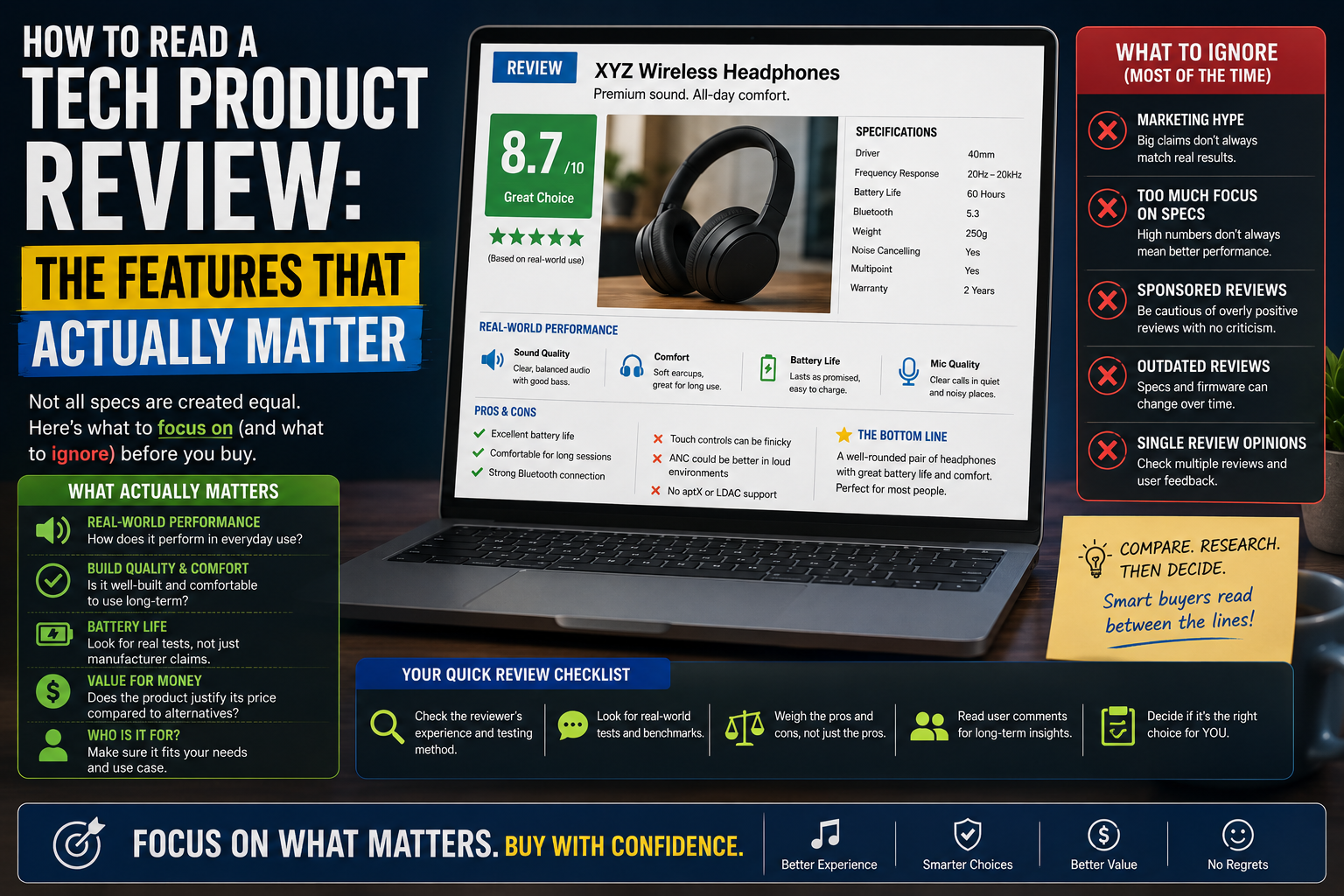
Technology product reviews play a vital role in modern consumer decisions. When shopping for a new laptop, smartphone, or peripheral, buyers frequently turn to professional evaluations, forums, and video breakdowns to guide their choices. However, these assessments can sometimes be difficult to navigate. Readers frequently encounter a confusing mix of technical jargon, marketing enthusiasm, and numerical star ratings that obscure whether a device is genuinely right for them.
To make informed purchasing decisions when buying technology, consumers must learn to look beyond surface-level star ratings, raw specifications, and promotional language. Understanding how to critically evaluate reviews helps shoppers distinguish between universal design excellence and features that genuinely serve their day-to-day habits.
1. Start With Your Own Needs
Before evaluating any review, you must first define your individual requirements. A product that earns universal praise from critics may still be a poor choice for your specific workflow. For example, a specialized creator laptop equipped with a color-accurate display and high-end graphics processing may offer little value to a user whose primary tasks involve web browsing and document editing.
When reading reviews, always filter the information through several personal criteria:
- Intended Use: What tasks will you perform daily?
- Budget: Are you paying for premium features you will never use?
- Performance Requirements: Do you need raw power, or is baseline efficiency sufficient?
- Compatibility: Will the device integrate smoothly with your existing hardware and software ecosystem?
- Portability: Do you travel frequently, or will the device remain stationary on a desk?
- Long-Term Use: Are you looking for a short-term stopgap or a multi-year investment?
For more advice on selecting equipment tailored to specific workflows, explore our [Internal Link: Buying Guides] and [Internal Link: Laptops].
2. Understand the Key Specifications
Specifications are the foundational building blocks of any device, but numbers alone rarely tell the complete story. To interpret technical data sheets effectively, you must understand what individual components do and how they interact.
- Processor (CPU): The central processing unit dictates general responsiveness and multitasking capability.
- RAM: Short-term memory allows your device to manage multiple open applications simultaneously.
- Storage: Solid-state drives provide rapid data access and ample space for operating systems, applications, and files.
- Display: Resolution, panel technology, and refresh rates dictate visual clarity and motion fluidity.
- Battery: Capacity ratings and power efficiency determine how long a device stays untethered.
- Camera: Sensor size, lens aperture, and image processing software influence photo and video quality.
- Connectivity: Modern Wi-Fi standards, Bluetooth versions, and physical ports dictate how easily a device connects to accessories and networks.
- Build Quality: Materials and structural design affect long-term durability and tactile feel.
Always consider these specifications in context. A high-end processor paired with inadequate cooling or insufficient RAM will fail to deliver its promised performance.
3. Look Beyond Marketing Claims
Manufacturers invest heavily in promotional copy designed to evoke excitement rather than convey precise technical details. When reading reviews, it is essential to translate common marketing buzzwords into practical realities.
- “Professional”: Frequently used to denote higher pricing or premium finishes rather than certified workplace reliability.
- “Ultra-fast”: A vague descriptor that rarely specifies whether it applies to read speeds, processing tasks, or network connectivity.
- “AI-powered”: A broad term applied to software enhancements, automated optimizations, or basic machine-learning routines.
- “Pro-grade”: Often interchangeable with high-tier consumer pricing tiers.
- “All-day battery”: A subjective claim that depends entirely on screen brightness, background tasks, and workload intensity.
- “Next-generation”: Simply indicates a chronological product refresh rather than a revolutionary technical leap.
- “Best-in-class”: A subjective evaluation that relies on specific, narrow testing parameters chosen by the manufacturer.
Independent reviews should substantiate these claims with objective measurements rather than repeating promotional talking points. For ongoing discussions on market trends, check out our [Internal Link: Comparisons].
4. Read the Pros and Cons
A balanced, trustworthy review will always feature a dedicated breakdown of strengths and weaknesses. Flawless products do not exist, and any evaluation that fails to uncover minor compromises or structural limitations warrants caution.
When examining the disadvantages listed in a review, ask yourself whether the drawback impacts your specific use case. For example, a gaming laptop review that notes heavy weight and poor battery life as major cons is largely irrelevant for a user who plans to keep the machine permanently plugged into a desk setup. Conversely, a missing port or limited keyboard travel might represent a dealbreaker for a mobile professional.
5. Understand Performance Claims
Performance evaluations often incorporate a mix of raw specifications, standardized benchmarks, and subjective user experiences. It is important to understand how these elements differ:
- Specifications: The raw ingredients of the hardware.
- Benchmarks: Controlled synthetic tests designed to measure peak theoretical capability.
- Real-world performance: How the device behaves during actual daily tasks, such as rendering video, compiling code, or switching between browser tabs.
- User experience: The subjective fluidity, stability, and responsiveness of the interface.
Synthetic benchmarks provide a helpful baseline for comparing competing devices, but they do not reflect thermal throttling, background software bloat, or long-term stability. Readers should prioritize evaluations that test devices under sustained, realistic workloads.
6. Battery Life Realities
Battery longevity is one of the most frequently misunderstood metrics in consumer technology. Advertised runtimes are typically gathered under optimal, highly controlled laboratory conditions—often involving low screen brightness, minimal background processes, and looping video playback.
Real-world battery life varies significantly based on active workloads. Factors that drain batteries faster include high display brightness, demanding applications, active network connections, intensive processor workloads, high screen refresh rates, and hidden background synchronization. When reading technology reviews, look for detailed breakdowns of how long a device lasts under mixed office use versus heavy gaming or media creation.
7. Display Quality Nuances
A screen is your primary interface with any digital device, making display evaluation critical. Reviewers often cite resolution, refresh rate, peak brightness, and panel technology (such as OLED versus LCD), but these metrics matter differently depending on your primary activity.
- Office Work: Prioritize sharp text rendering, anti-glare coatings, and comfortable scaling.
- Gaming: Focus heavily on high refresh rates and rapid pixel response times to minimize motion blur.
- Watching Movies: Look for wide color gamuts, deep contrast ratios, and HDR support.
- Photo/Video Editing: Prioritize color accuracy, wide color space coverage (such as DCI-P3 or sRGB), and stable calibration.
- Everyday Use: Balance adequate outdoor visibility with comfortable brightness levels for indoor environments.
8. Build Quality and Design
Physical design extends far beyond aesthetic appeal. When evaluating a device’s physical construction, consider the materials used, overall weight, ergonomics, durability, port selection, portability, and ease of repair.
A sleek, ultra-thin chassis may look appealing in promotional imagery, but it can force thermal compromises that throttle processor speeds under load. Similarly, a device lacking essential physical ports may force users into purchasing costly external adapters.
9. Software and Updates
Hardware represents only half of the technology equation. The operating system, pre-installed software bloat, user interface design, and long-term security update support heavily dictate the lifespan of a product.
A powerful machine with an abandoned software ecosystem or infrequent security patches can quickly become vulnerable or frustrating to use. Check how many years of major operating system updates and security patches the manufacturer promises before purchasing.
10. Price and Value
Discerning the difference between price and value is crucial. Price is the numerical cost printed on the retail tag, while value represents what you receive relative to that cost. A more expensive product is not automatically better for every buyer; it simply offers a broader set of features or higher raw performance tiers.
Buyers should evaluate whether paying an extra premium for incremental performance gains or luxury materials aligns with their personal budget and intended use. To find devices that strike an optimal balance between cost and capability, visit our [Internal Link: Best Picks].
11. Who Is the Product Actually For?
A well-crafted product review should explicitly identify its target audience. Devices are engineered with specific user personas in mind, and recognizing these categories helps prevent mismatched expectations:
- Students: Prioritize affordability, reliable battery life, durability, and portability.
- Office Users: Focus on keyboard comfort, reliable connectivity, multitasking stability, and software compatibility.
- Gamers: Demand high-performance graphics processing, fast display refresh rates, and robust cooling.
- Creators: Require color-accurate displays, powerful multi-core processors, ample RAM, and fast storage speeds.
- Professionals: Look for enterprise-grade security, build reliability, and extended support lifecycles.
- Casual Users: Seek simplicity, intuitive interfaces, and dependable everyday performance.
- Enthusiasts: Value modularity, customization options, cutting-edge features, and maximum performance headroom.
12. Red Flags to Watch For in Reviews
Not all reviews are created equal. When reading online assessments, watch out for common warning signs that indicate bias, superficial testing, or low editorial integrity:
- Exclusive focus on positive features while ignoring structural flaws.
- Complete absence of limitations or trade-off discussions.
- Unsupported performance claims that contradict known hardware limitations.
- Fake testing claims that lack methodology or supporting data.
- No mention of relevant market alternatives.
- Excessive marketing language that mimics promotional brochures.
- Failure to identify who the product is actually designed for.
- Outdated specifications referenced as cutting-edge features.
- No clear source or methodology for important performance claims.
13. How to Compare Two Reviews
When conflicting opinions emerge across different publications, readers should avoid simply choosing the review that offers the higher score. Instead, compare the evaluations systematically by examining testing methods, publication dates, product software versions, regional hardware variations, and the specific use cases highlighted by each reviewer. Evidence-backed observations should always carry more weight than subjective impressions.
14. A Simple Product Review Checklist
Before trusting a technology review or making a final purchase, run through this practical checklist:
- What is the product being evaluated?
- Who is the intended target audience?
- What are the core strengths identified?
- What are the primary weaknesses or limitations?
- What important technical specifications are highlighted?
- How does the device compare with existing market alternatives?
- Is the publication date current relative to the product lifecycle?
- Is there a disclosed commercial relationship or affiliation?
- Does the provided evidence genuinely support the reviewer’s claims?
Comparison Table
| Review Factor | What to Check | Why It Matters |
| Performance | Sustained workloads and real-world responsiveness | Dictates how the device handles daily tasks without slowing down. |
| Build Quality | Materials, structural rigidity, and ergonomics | Affects physical durability, comfort, and long-term usability. |
| Display | Resolution, brightness, refresh rate, and color accuracy | Determines visual clarity, eye comfort, and creative suitability. |
| Battery | Real-world mixed usage and charging speeds | Dictates mobility and how often you need to stay tethered to a wall outlet. |
| Software | Interface design, update longevity, and pre-installed bloatware | Impacts day-to-day usability, security, and long-term software support. |
| Features | Port selection, wireless standards, and extra hardware additions | Influences how easily the device integrates into your existing setup. |
| Compatibility | Ecosystem integration and peripheral support | Ensures the device works smoothly with your current software and gear. |
| Price | Retail cost relative to performance and feature set | Determines overall economic value and whether you are overpaying. |
| Long-term support | Manufacturer update policies and component reliability | Protects your investment over several years of active use. |
| Alternatives | Competing products at similar price points | Helps verify whether a better option exists for your specific needs. |
For deeper dives into specific product categories, explore our dedicated sections on [Internal Link: Phones], [Internal Link: PC Hardware], and [Internal Link: Gaming].
FAQ
- Q: Are star ratings enough to judge a tech product?
- A: No. Star ratings simplify complex trade-offs into a single number that rarely reflects individual user needs. Always read the accompanying analysis.
- Q: Why do different reviewers report different battery life figures?
- A: Battery runtime depends heavily on testing conditions, including screen brightness levels, background synchronization, network types, and app workloads.
- Q: Should I buy a product as soon as it is reviewed?
- A: Waiting a few weeks after launch allows independent long-term testing to surface hidden software bugs or durability issues.
- Q: Do synthetic benchmarks matter for everyday users?
- A: Benchmarks primarily highlight peak performance headroom. Everyday users benefit far more from real-world responsiveness and software stability.
- Q: How can I tell if a review is biased?
- A: Biased reviews often rely on excessive marketing copy, avoid discussing product limitations, and lack transparent testing methodologies.
- Q: Is it safe to buy a product with minor cons?
- A: Yes, provided those cons do not impact your specific workflow. Every device involves engineering compromises.
- Q: Why do prices fluctuate after a product review is published?
- A: Retail pricing shifts due to promotional sales, supply chain adjustments, and competing product launches over time.
Conclusion
The most valuable technology review is not necessarily the one attached to the highest score or the most enthusiastic praise. Instead, the best review is one that provides clear, transparent, and comprehensive information, allowing you to determine whether a device fits your unique habits, workflow, and budget. By stripping away marketing language, examining specifications in context, and understanding your own technical requirements, you can navigate the consumer technology landscape with confidence.
PCMag – PCMag’s own explanation of how their PC Labs testing process works, including how they benchmark performance against competing products using both software tests and real-world applications. Click here to open the guide.
CNET – CNET’s breakdown of their two-part review process — controlled lab performance testing plus extensive hands-on use — and how they combine objective and subjective judgments into a final verdict. Click here to open the guide.
RTINGS – A look inside how RTINGS builds its data-driven reviews, including how many individual tests go into a single review and why standardized testing helps you compare products fairly. Click here to open the guide.
Better Business Bureau – Official consumer-protection guidance on spotting fake reviews, including how to check for verified-purchase labels, generic or overly enthusiastic language, and clustered review timing. Click here to open the guide.
Forbes Vetted – An expert-sourced guide on identifying fake reviews, drawing on interviews with FTC and Amazon trust-and-safety officials, plus tools like Fakespot that help flag suspicious review patterns. Click here to open the guide.