
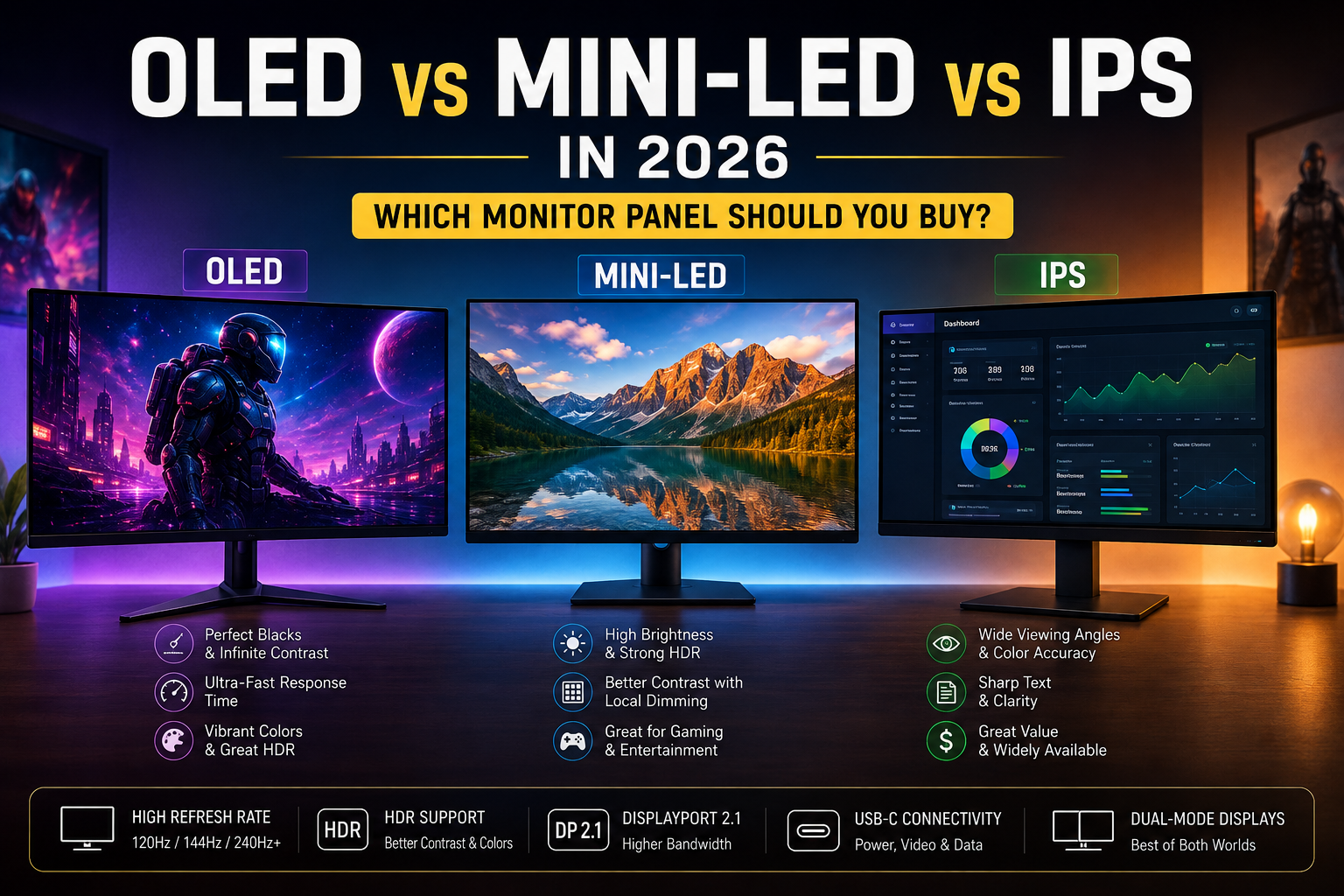
Buying a monitor used to come down to one real decision: 1080p, 1440p, or 4K. That’s no longer true. In 2026, the panel technology behind the screen matters just as much as the resolution printed on the box — and the options have multiplied.
You’ll now see monitors built around IPS, VA, OLED, QD-OLED, WOLED, and Mini-LED backlighting, often at similar price points, each making different trade-offs in contrast, brightness, motion, and longevity. Layer on refresh rates ranging from 60Hz to 500Hz-plus, HDR implementations that vary wildly in actual quality, connectivity standards like DisplayPort 2.1 and USB-C, and a new generation of dual-mode displays that switch between resolution and refresh rate on the fly, and it’s easy to see why monitor shopping has gotten genuinely complicated.
There is no single “best” panel technology in 2026. The right choice depends on what you actually do with your monitor — competitive gaming, cinematic single-player games, spreadsheets and code all day, photo editing, or some mix of all of it — along with your room lighting, budget, and how long you plan to keep the display. This guide walks through what each panel type actually does well, where it falls short, and which one makes sense for different kinds of buyers.
What Is a Monitor Panel?
The “panel” is the physical layer of the display that produces the image you see. It’s the single biggest factor in how a monitor performs, because it directly determines:
- Contrast — the difference between the darkest and brightest parts of the image
- Black levels — how genuinely dark a “black” pixel actually looks
- Brightness — how bright the display can get, both for SDR content and HDR highlights
- Color — how accurate and how wide-ranging the colors are
- Response time — how quickly pixels can change from one color to another
- Viewing angles — how much the image shifts in color or contrast when viewed off-center
- HDR performance — how convincingly the display can show a wide range of brightness in the same scene
- Motion clarity — how sharp fast-moving objects look, closely tied to response time and refresh rate
- Text clarity — how crisp small text renders, which depends partly on subpixel layout
- Power consumption — how much electricity the display draws during typical use
- Longevity — how the display’s performance holds up over years of use
Two monitors with identical specs on paper — same resolution, same refresh rate — can look and behave very differently depending on the underlying panel. That’s why understanding the basics of OLED, Mini-LED, and IPS is worth the time before you buy.
OLED Monitors Explained
OLED (organic light-emitting diode) panels are “self-emissive,” meaning every individual pixel produces its own light and can be turned on, dimmed, or switched off completely, independent of every other pixel. That’s fundamentally different from LCD-based panels, which rely on a separate backlight shining through a layer of liquid crystal.
That pixel-level control is the source of OLED’s biggest strengths:
- True blacks. A pixel that’s off produces no light at all, which means OLED can achieve genuinely inky blacks rather than a dark gray.
- Extremely fast pixel response. OLED pixels can change state almost instantly, which translates into sharp, clean motion with minimal smearing or ghosting.
- Exceptional contrast. Because blacks are essentially perfect, the contrast ratio between the darkest and brightest parts of an image is effectively unmatched by LCD technology.
- Strong HDR performance. The combination of true blacks and per-pixel brightness control lets OLED render HDR scenes — a bright explosion against a dark background, for example — with a level of punch that LCD-based panels struggle to match.
- Wide, consistent viewing angles. OLED image quality holds up well even when viewed from the side, unlike some LCD technologies.
- Strong color performance. OLED panels, particularly QD-OLED variants, tend to produce vivid, accurate color.
For gaming, these traits combine into a genuinely different visual experience — especially in dark or moody games, and especially for fast-paced titles where motion clarity matters. For productivity, the deep contrast and accurate color can make an OLED monitor a pleasure to look at for photo work, video editing, or just browsing.
The trade-offs are real, though, and worth taking seriously.
The most talked-about is image retention and burn-in — a risk where static elements displayed for very long periods (a taskbar, a browser UI, a game’s HUD) can leave a faint, persistent trace on the panel over time. Modern OLED monitors include several mitigation technologies — pixel-shifting the image slightly on a slow cycle, dimming static bright elements after a few minutes, and periodic compensation cycles that run when the monitor is idle — and many manufacturers now back their panels with multi-year burn-in warranties. These measures meaningfully reduce the risk compared to early OLED TVs and monitors. But the risk isn’t zero, and anyone who displays the same static content — spreadsheets, a fixed desktop layout, a 24/7 monitoring dashboard — for many hours a day, every day, should weigh this trade-off seriously before choosing OLED.
Other limitations include:
- Brightness behavior. OLED panels are generally very good at peak brightness in small, bright HDR highlights, but sustained full-screen brightness is typically lower than what Mini-LED can achieve — relevant if you work in a very bright room.
- Text rendering differences. Because OLED panels don’t always use the same subpixel layout as traditional LCD monitors, small text can render slightly differently — sometimes with faint color fringing around fine details — depending on the specific panel type and pixel density. This has improved significantly in recent panel generations but hasn’t fully disappeared.
- Price. OLED monitors remain more expensive than comparable IPS or VA options, though prices have come down meaningfully as more manufacturers have entered the space.
- Static desktop workloads. For a monitor that will spend eight-plus hours a day showing the same office applications with little variation, the burn-in consideration and higher price make OLED a less automatic choice than it is for gaming or media.
What Is QD-OLED?
QD-OLED is a specific type of OLED panel, primarily manufactured by Samsung Display, and it’s worth understanding as distinct from the “WOLED” panels made by LG Display, since both get sold under the general “OLED monitor” label.
The core difference is in how the panel produces color. Traditional WOLED panels use a white OLED layer combined with color filters, and typically add a dedicated white subpixel alongside red, green, and blue to boost brightness efficiency. QD-OLED instead uses blue OLED emitters combined with a layer of quantum dots — nanoscale particles that convert light into precise red and green wavelengths — to produce color without relying on traditional color filters or a white subpixel.
In practice, this tends to give QD-OLED an edge in color volume, meaning it can maintain rich, saturated colors even at higher brightness levels, which is particularly noticeable in HDR content with bright, colorful highlights. Many reviewers and manufacturers describe QD-OLED as excelling in dark-room viewing and color-critical HDR content, while WOLED panels — thanks to that dedicated white subpixel — tend to hold up better for sustained brightness and in brighter rooms.
QD-OLED’s other well-known characteristic is its subpixel layout. Early QD-OLED panels used a triangular RGB subpixel arrangement rather than the straight horizontal stripe used by most traditional LCD monitors, which could cause faint color fringing around small text — something some users doing heavy text work found noticeable, even if it’s rarely an issue in games or video. Newer panel generations, including layouts Samsung markets as “V-Stripe,” along with higher pixel-density panels overall, have measurably reduced this effect, though it hasn’t been eliminated across the entire product line.
It’s important not to overgeneralize here: not every QD-OLED monitor automatically outperforms every WOLED monitor, and vice versa. Panel generation, brightness tuning, coating, and the specific implementation from each manufacturer all affect the final result. Treat “QD-OLED” and “WOLED” as two different design philosophies with different strengths, not a strict quality hierarchy.
What Is Mini-LED?
Mini-LED is sometimes lumped in with OLED because both are heavily marketed around HDR performance, but the underlying technology is completely different. Mini-LED is not a self-emissive panel — it’s still an LCD display. What changes is the backlight: instead of a small number of large LEDs illuminating the entire screen relatively evenly, Mini-LED packs in a much larger number of significantly smaller LEDs, grouped into independently controlled zones.
The key concepts to understand:
- Local dimming. Because the backlight is divided into many zones, different areas of the screen can be brightened or dimmed independently, allowing dark scenes to look darker in some areas while bright highlights stay bright elsewhere.
- Dimming zones. The number of zones varies significantly between monitors — more zones generally means more precise control and fewer visible artifacts, though zone count alone doesn’t tell the whole story of image quality.
- Brightness. Because Mini-LED backlights use conventional LED technology rather than self-emissive OLED pixels, they can typically sustain very high full-screen brightness levels more easily than OLED, which is a meaningful advantage in bright rooms or for HDR content that fills more of the screen.
- Contrast improvement. Compared to traditional LCD backlighting, Mini-LED’s local dimming produces noticeably deeper blacks and stronger contrast — though still not matching OLED’s per-pixel control.
- Blooming. The most common criticism of Mini-LED is “blooming” or “haloing” — a faint glow visible around bright objects on a dark background, caused by the fact that dimming zones cover multiple pixels rather than each pixel individually. More dimming zones and better backlight algorithms reduce this, but it hasn’t been fully eliminated by any current Mini-LED implementation.
For gaming, Mini-LED offers strong HDR and high sustained brightness without the burn-in considerations that come with OLED, making it an appealing middle ground for people who want vivid, punchy visuals but are wary of OLED’s long-term static-content trade-offs. For productivity and content creation, Mini-LED’s high brightness ceiling is genuinely useful for photo and video work involving bright, high-dynamic-range footage, though color accuracy and consistency still depend heavily on the individual panel and its factory calibration.
Mini-LED is particularly attractive for buyers who want strong HDR and high brightness but either can’t justify OLED pricing or specifically want to avoid OLED’s burn-in considerations for a desktop-heavy workload.
What Is IPS?
IPS (in-plane switching) is a long-established LCD panel technology, and despite the rise of OLED and Mini-LED, it remains one of the most widely used panel types in 2026 — for good reason.
IPS panels are known for:
- Color consistency. IPS panels generally maintain accurate, stable color across the screen and at various brightness levels, which is a major reason they’ve long been favored for color-sensitive work.
- Wide viewing angles. Compared to older LCD technologies like TN, IPS holds up well when viewed off-axis, with less color and contrast shift.
- Productivity suitability. Even, consistent brightness and reliable text rendering make IPS a comfortable choice for long sessions of reading, writing, coding, or working across multiple windows.
- Text clarity. IPS panels use a conventional subpixel layout that’s well-matched to how operating systems render text, generally producing crisp, artifact-free small text.
- Price. IPS remains the most affordable panel technology at any given resolution and refresh rate, and high-quality options are available across a wide range of budgets.
- Gaming. High-refresh IPS panels — including many at 144Hz, 165Hz, and beyond — are widely available and offer solid motion performance, even if they can’t match OLED’s per-pixel response time.
- Professional work. Many IPS monitors, especially those aimed at creative professionals, offer strong factory color calibration and wide gamut coverage suitable for serious photo and design work.
IPS panels can’t match OLED’s contrast or Mini-LED’s peak brightness, and their black levels remain a clear weak point — an IPS panel’s “black” is really a dark gray, especially noticeable in dim rooms. But IPS hasn’t disappeared because it doesn’t need to compete on those exact terms. For the enormous number of buyers who prioritize reliable color, comfortable all-day usability, broad availability, and value, IPS remains a genuinely strong choice rather than a compromise.
OLED vs Mini-LED vs IPS: Head-to-Head Comparison
| Category | OLED | Mini-LED | IPS |
|---|---|---|---|
| Black levels | Excellent — true per-pixel black | Good — strong but with some backlight bleed | Fair — dark gray rather than true black |
| Contrast | Excellent — effectively infinite | Very good — significantly better than standard LCD | Good — limited by backlight bleed |
| HDR | Excellent for highlights and dark scenes | Excellent for sustained brightness and bright scenes | Fair — typically limited HDR impact |
| Brightness (sustained) | Good, but generally lower than Mini-LED | Excellent — often the brightest option | Good — consistent, though rarely class-leading |
| Response time | Excellent — near-instant | Good — limited by LCD pixel response | Good — solid but slower than OLED |
| Motion clarity | Excellent | Good | Good |
| Color | Excellent, especially QD-OLED | Very good, panel-dependent | Very good, especially color-calibrated models |
| Viewing angles | Excellent | Good, varies by panel | Very good |
| Text clarity | Good, improving; some fringing on certain panels | Excellent — standard LCD subpixel layout | Excellent |
| Burn-in concern | Present, mitigated by modern safeguards | None | None |
| Productivity | Very good, with burn-in caveat for static content | Very good | Excellent |
| Gaming | Excellent, especially fast and dark-scene games | Very good, especially bright HDR games | Good to very good, depending on refresh rate |
| Content creation | Excellent color and contrast | Very good, especially for bright HDR footage | Very good, especially color-accurate models |
| Price | Highest | High to mid-high | Most affordable |
| Long-term static desktop use | Requires care due to burn-in consideration | Excellent | Excellent |
No single row makes one technology the obvious winner across the board — which is exactly the point. The right panel depends on which rows matter most for how you’ll actually use the monitor.
OLED vs Mini-LED for Gaming
For gamers specifically weighing OLED against Mini-LED, a few factors matter more than the rest.
Response time and motion clarity favor OLED clearly. Because OLED pixels switch almost instantly, fast-moving scenes — competitive shooters, fighting games, racing titles — tend to look cleaner, with less smearing behind moving objects, compared to Mini-LED’s LCD-based pixel response.
Refresh rate and VRR are supported well by both technologies at this point; high refresh rates and variable refresh rate (VRR) technologies like G-Sync and FreeSync are broadly available across current OLED and Mini-LED gaming monitors, so this isn’t a strong differentiator between the two panel types themselves.
HDR and contrast is where the two technologies diverge in character rather than raw quality. OLED tends to shine in dark, atmospheric scenes — horror games, moody open-world titles, anything with a lot of black in the frame — because of its true blacks. Mini-LED tends to shine in bright, high-dynamic-range scenes with a lot of the screen lit up, where its higher sustained brightness gives HDR highlights more punch without the risk of the whole panel’s brightness being limited.
Room lighting matters more than people expect. OLED performs best in dim to moderately lit rooms; in a very bright room, Mini-LED’s higher sustained brightness can actually deliver a more comfortable and vivid HDR experience.
Competitive gaming — where response time, motion clarity, and consistent performance under long play sessions matter most — tends to favor OLED for the pixel response and Mini-LED for players wary of burn-in risk from static HUD elements displayed for extended competitive sessions.
Cinematic, story-driven games tend to benefit most from OLED’s contrast and black levels, since these titles are more likely to include dark, atmospheric scenes where OLED’s strengths are most visible.
One point worth being direct about: no monitor panel compensates for an underpowered GPU. A 240Hz OLED panel connected to a graphics card that can only render 90 frames per second in a demanding game will not deliver a 240Hz experience — it will deliver whatever frame rate the GPU can produce, just with lower input latency and cleaner motion at that frame rate. Matching your monitor’s capabilities to your GPU’s realistic output is more important than chasing headline refresh-rate numbers.
OLED vs IPS for Work and Productivity
For office work, coding, spreadsheets, and general productivity, the calculus shifts meaningfully compared to gaming.
Text clarity has historically favored IPS, since its conventional subpixel layout is what modern text-rendering technology (like ClearType on Windows) was designed around. OLED text clarity has improved substantially with newer panel generations and higher pixel densities, but it can still show minor fringing on some panels, particularly at smaller sizes or lower pixel densities — something worth checking in reviews for the specific monitor you’re considering, especially if you spend long hours reading small text.
Static windows — the browser tabs, spreadsheet grids, and IDE layouts that stay in the same place for hours — are exactly the scenario where OLED’s burn-in consideration is most relevant. This doesn’t mean OLED is unsuitable for office work; many people use OLED monitors for productivity without issue, especially with modern mitigation features and habits like auto-hiding taskbars and using dark themes. But it does mean the trade-off deserves real consideration if your monitor will display the same static layout for eight or more hours a day, every day.
Brightness and viewing comfort in typical office lighting tend to favor IPS, which is generally designed for consistent, comfortable brightness across long sessions without the highlight-focused brightness behavior that some OLED panels exhibit.
Practical advice: if you spend the bulk of your day looking at largely static content — email, spreadsheets, documents, a fixed application layout — a high-quality IPS monitor is often the more comfortable, lower-risk, and more affordable choice. If your work also involves significant photo or video editing, dark-room use, or you simply want the contrast and color benefits and are comfortable with the mitigation habits OLED requires, it remains a legitimate option — just not an automatic upgrade purely because it has better contrast on paper.
Mini-LED vs IPS
Mini-LED is best understood as “IPS, but with a dramatically better backlight” — many Mini-LED monitors are, in fact, built on IPS LCD panels, with the local-dimming backlight layered underneath.
HDR and brightness are where Mini-LED clearly justifies its price premium. If HDR content — games, movies, or bright photo and video work — is a priority, Mini-LED’s local dimming and higher brightness ceiling deliver a noticeably more dynamic image than standard IPS backlighting.
Contrast and local dimming give Mini-LED a real edge in dark scenes compared to standard IPS, though not to the level of OLED’s per-pixel control. The trade-off is blooming — a soft glow around bright objects against dark backgrounds — which varies in visibility depending on the number of dimming zones and the quality of the backlight algorithm. Higher-end Mini-LED monitors with more zones handle this considerably better than budget implementations, so it’s worth checking reviews for the specific zone count and blooming behavior rather than assuming all Mini-LED monitors perform similarly.
Productivity sees a smaller practical difference; a standard IPS monitor is already well-suited to office and coding work, and Mini-LED’s main advantage here is a higher brightness ceiling that mostly matters in very bright rooms or for HDR content viewing.
Gaming and movie watching are where Mini-LED’s investment pays off most clearly, particularly for HDR content and bright, colorful games.
For many users, though, a high-quality standard IPS monitor remains the better value — particularly if HDR and local dimming aren’t priorities. The premium for Mini-LED is real, and it’s worth paying only if you’ll actually benefit from the brightness and contrast improvements it offers.
What About VA Monitors?
VA (vertical alignment) panels sit between IPS and older TN technology in terms of characteristics, and they still occupy a meaningful niche in 2026, particularly in curved and ultrawide monitors.
VA’s core strength is contrast and black levels — noticeably better than IPS, though still well short of OLED’s true blacks. This makes VA a popular choice for curved and ultrawide gaming monitors, where the combination of an immersive field of view and deeper contrast than IPS creates an appealing, budget-friendlier alternative to OLED ultrawides.
Motion performance on VA panels has historically lagged behind IPS and OLED, with some models prone to visible smearing in dark, fast-moving scenes, though this has improved on higher-end VA panels in recent years.
Value is VA’s other strong point: it’s often possible to find a large, curved, high-contrast VA monitor at a price well below an equivalent OLED or Mini-LED option, making it a reasonable middle ground for buyers who want more contrast than IPS without paying OLED or premium Mini-LED prices.
Does Refresh Rate Matter More Than Panel Type?
Refresh rate and panel type solve different problems, and the common range of options now spans 60Hz, 75Hz, 120Hz, 144Hz, 165Hz, 240Hz, 360Hz, and even higher competitive-focused refresh rates.
Higher refresh rates can meaningfully improve motion smoothness and reduce perceived input lag, but the actual benefit depends on several factors working together:
- Game type. Fast-paced competitive games (shooters, fighting games) benefit far more from high refresh rates than slower-paced or turn-based games.
- GPU performance. A high refresh rate is only useful if your graphics card can actually produce frames fast enough to take advantage of it in the games you play.
- Frame rate. Refresh rate is the display’s maximum; your actual experience is capped by whichever is lower — the monitor’s refresh rate or your GPU’s frame rate output.
- User sensitivity. Not everyone perceives the difference between, say, 144Hz and 240Hz equally; the gains become progressively harder to notice at the very high end for many players.
- Resolution. Higher resolutions demand significantly more GPU power to sustain high frame rates, which is part of why very high refresh rates are more commonly paired with 1080p or 1440p than native 4K.
For most office and productivity work, refresh rate above 60-75Hz offers comfort benefits (smoother scrolling, less eye strain for some users) but isn’t a critical purchasing factor the way it is for gaming. Extremely high refresh rates — 240Hz and beyond — are primarily relevant to competitive gaming, where consistent, high, and stable frame rates are a meaningful part of the experience; for general use, they’re a nice-to-have rather than a necessity.
Does 4K Matter More Than OLED?
This is really a question about which trade-off matters more for your use case, since resolution and panel technology solve different problems.
- 1440p OLED delivers OLED’s contrast, motion, and HDR advantages at a resolution that’s considerably easier for a GPU to drive at high frame rates — a strong pick for gamers prioritizing high refresh rates and visual impact over maximum sharpness.
- 4K IPS offers sharp, detailed images and excellent text clarity for productivity and content work, without OLED’s price premium or burn-in consideration, though contrast and black levels remain IPS’s weak point.
- 4K OLED combines sharpness with OLED’s contrast and HDR strengths, but demands significantly more GPU power to drive at high frame rates, and carries the highest price tag of the group.
- 4K Mini-LED offers a strong middle path — sharp detail, high brightness, and solid HDR — for buyers who want a bright, detailed image without OLED’s burn-in trade-off, again at a meaningful GPU and cost premium.
In practice, resolution, panel technology, refresh rate, viewing distance, and GPU performance all interact. A 27-inch 1440p OLED viewed at a typical desk distance can look extremely sharp, while a 32-inch 4K IPS monitor used for detailed photo editing offers sharpness that panel contrast alone can’t replace. There’s no universal answer — it depends on what you’re prioritizing and what your GPU can realistically drive.
DisplayPort 2.1 and HDMI 2.1 in 2026
Connectivity has become a genuinely important consideration for high-end monitors, because the highest resolutions and refresh rates now available can outpace older cable standards.
HDMI 2.1 offers a maximum bandwidth of 48 Gbps, which is enough for many 4K high-refresh configurations, particularly with Display Stream Compression (DSC) — a visually lossless compression technology that reduces the data needed to transmit a signal.
DisplayPort 2.1 raises the ceiling considerably, with a maximum specified bandwidth of up to 80 Gbps. However, DisplayPort 2.1 is not a single fixed speed — it includes multiple bandwidth tiers (commonly referred to as UHBR10, UHBR13.5, and UHBR20), and a monitor or graphics card labeled “DisplayPort 2.1” does not automatically support the highest tier. This distinction matters: a monitor that only supports the lowest DP 2.1 tier can actually offer less bandwidth than HDMI 2.1, despite having the newer-sounding label.
USB-C and DisplayPort Alt Mode have also become increasingly relevant, particularly for laptop users who want a single cable to handle video, power delivery, and data. Not all USB-C monitor connections support the same bandwidth or power delivery wattage, so it’s worth checking the specific implementation rather than assuming all “USB-C monitors” behave identically.
It’s important not to overstate the requirement here: DisplayPort 2.1 is not necessary for every 4K monitor. Many 4K displays at 60Hz, 120Hz, or even 144Hz run comfortably within HDMI 2.1 or lower DisplayPort 2.1 tiers, especially with DSC in play. The monitors that genuinely benefit from the higher tiers of DisplayPort 2.1 are those targeting very high combinations of resolution and refresh rate — think 4K at 240Hz — where uncompressed bandwidth becomes a real constraint. Before paying a premium for top-tier DisplayPort 2.1 support, check whether your GPU, cable, and target resolution/refresh combination actually need it.
Dual-Mode Monitors in 2026
A growing category of monitors now offers dual-mode operation — the ability to switch between two different resolution and refresh-rate configurations rather than being locked into one.
The concept, in practice, usually looks like this:
- A high-resolution mode (such as 4K) for single-player games, movies, and productivity work, prioritizing image sharpness and detail.
- A lower-resolution, higher-refresh mode (such as dropping to 1080p) for competitive gaming, prioritizing frame rate and motion clarity over pixel density.
This appeals most directly to gamers who split their time between visually rich single-player or cinematic games and fast-paced competitive titles, without wanting to own two separate monitors. It’s a genuinely useful feature for that specific use case, but it does come at a price premium, and it’s worth being honest with yourself about whether you’ll actually use both modes regularly — for someone who plays almost exclusively one type of game, a dual-mode display’s second mode may end up rarely used, making a dedicated single-mode monitor the better value.
Which Monitor Panel Is Best for Different Users?
Best for Competitive Gamers
Prioritize fast response time, high and stable refresh rates, and low input latency. OLED’s near-instant pixel response is a strong fit, though high-refresh IPS and VA panels remain solid, more affordable alternatives if OLED’s price or burn-in consideration is a concern for extended competitive sessions with static HUD elements.
Best for Cinematic Gaming
Contrast, HDR, and response time matter most for immersive, story-driven, and atmospheric games. OLED’s true blacks and strong HDR performance make it the standout choice here, with Mini-LED as a strong alternative for brighter-room setups.
Best for Office Work
Prioritize text clarity, ergonomics, comfortable sustained brightness, and long-session usability over contrast or peak HDR performance. A high-quality IPS monitor is generally the most comfortable, lowest-risk choice for this use case.
Best for Programming
Text rendering, resolution, and screen real estate matter more than contrast or motion performance here. A sharp IPS monitor at 1440p or 4K, with a size that suits comfortable code and terminal viewing, is typically the most productive choice; those drawn to OLED’s contrast should check specific panel reviews for text-fringing behavior at their preferred font size first.
Best for Content Creators
Color accuracy, HDR capability, resolution, and consistency across long sessions all matter. Depending on the specific work, either a well-calibrated IPS monitor or a QD-OLED/Mini-LED display can be strong choices — the deciding factor is usually whether the work benefits more from color volume and contrast (favoring OLED/Mini-LED) or from consistent, predictable color across the whole panel (favoring IPS).
Best for Photo and Video Editing
Color accuracy and calibration matter more than raw contrast for most photo work. Look specifically for factory-calibrated panels with documented color gamut coverage (like DCI-P3 or Adobe RGB percentages) rather than assuming any OLED or Mini-LED monitor is automatically suited to color-critical work.
Best for Mixed Gaming + Work
This category inherently requires compromise, since gaming and static productivity work favor different panel traits. A high-refresh IPS or Mini-LED monitor is often a reasonable middle ground; OLED can work well too, provided you’re comfortable with basic burn-in mitigation habits like auto-hiding taskbars and varying your desktop layout.
Best for Budget Buyers
A well-reviewed IPS monitor remains an excellent choice, delivering solid color accuracy, wide viewing angles, and dependable text clarity at the most accessible price point of any panel technology discussed here — without the burn-in considerations of OLED or the blooming considerations of budget Mini-LED implementations.
Monitor Buying Checklist for 2026
Before buying, ask yourself:
- What will I primarily use the monitor for?
- What resolution can my GPU realistically drive at a frame rate I’ll be happy with?
- How much refresh rate do I actually need for the games or work I do?
- Do I need HDR, and will my typical content actually take advantage of it?
- Do I work with the same static windows or layout for many hours a day?
- Is OLED’s burn-in consideration acceptable given how I’ll use the monitor?
- Do I need USB-C, and if so, what power delivery wattage do I need?
- Do I need DisplayPort 2.1, and specifically which bandwidth tier?
- Do I need HDMI 2.1 for console or home-theater compatibility?
- Do I want an ultrawide or curved display, and does my desk fit it?
- Would a dual-mode display’s second mode actually get regular use?
- What screen size fits my desk and typical viewing distance?
- What is my actual budget, including any cables or accessories I might need?
Common Monitor Buying Mistakes
- Buying based only on refresh rate, without considering whether your GPU can actually sustain frame rates that take advantage of it.
- Ignoring resolution in favor of chasing a high refresh-rate number, ending up with a mismatch between sharpness and motion performance.
- Buying OLED without considering usage patterns, particularly for heavily static, all-day desktop work.
- Assuming Mini-LED has no blooming. Zone count and backlight algorithm quality vary significantly, and even good implementations show some blooming in specific scenes.
- Assuming every OLED panel has identical image quality. WOLED, QD-OLED, and different panel generations all behave differently in brightness, color, and text rendering.
- Ignoring HDR implementation. An “HDR” label doesn’t guarantee a meaningful HDR experience; actual peak brightness, contrast, and dimming zone count matter far more than the label itself.
- Ignoring ports. Buying a monitor without checking that it has the specific connector types and bandwidth tiers your PC, console, or laptop actually needs.
- Buying more monitor than the GPU can properly drive, resulting in a high-refresh or high-resolution display that rarely operates near its actual capability.
- Ignoring ergonomics. Height, tilt, and swivel adjustability matter enormously for comfort during long sessions, and are easy to overlook when focused on panel specs.
- Choosing specifications over actual use. The “best” monitor on paper isn’t the best monitor for you if it doesn’t match how you’ll actually use it day to day.
OLED vs Mini-LED vs IPS: Final Verdict
There is no universally “best” panel technology in 2026 — only the panel that best matches your priorities.
Choose OLED if: you prioritize contrast, HDR impact, and the fastest possible response time, particularly for gaming or media in a dim to moderately lit room, and you’re comfortable with basic habits to manage burn-in risk on any static content.
Choose Mini-LED if: you want very high, sustained brightness and strong HDR and contrast performance, especially in a bright room, while avoiding OLED-specific burn-in considerations — a strong middle ground between OLED and standard LCD technology.
Choose IPS if: you want dependable, well-rounded performance, excellent text clarity, wide availability across every price point, and strong value for long productivity sessions, without the price premium or burn-in trade-offs of the alternatives.
Consider VA as a value-focused middle ground, particularly for curved and ultrawide gaming setups where its stronger contrast than IPS is a meaningful upgrade at a more accessible price than OLED.
Whichever technology you land on, match the panel to how you’ll actually use the monitor — not to whichever spec sheet looks most impressive.
Frequently Asked Questions
Is OLED better than IPS in 2026? OLED offers better contrast, black levels, and response time, making it excellent for gaming and dark-room media use. IPS offers better value, comparable or better text clarity, and no burn-in consideration, making it well-suited to long productivity sessions. Neither is universally “better” — it depends on your use case.
Is Mini-LED better than OLED? Mini-LED typically offers higher sustained brightness and no burn-in consideration, while OLED offers deeper blacks, better contrast, and faster response time. Mini-LED tends to be the stronger choice in bright rooms and for buyers wary of static-content risk; OLED tends to be stronger for dark-room, contrast-focused viewing.
Is OLED good for office work? It can be, and many people use OLED monitors for office work without issue, especially with basic burn-in mitigation habits like auto-hiding the taskbar and varying window layouts. But for many hours of daily static content, a high-quality IPS monitor is generally the lower-risk, more budget-friendly choice.
Does OLED still have burn-in problems in 2026? Modern OLED monitors include multiple mitigation technologies — pixel shifting, static-element dimming, and compensation cycles — along with multi-year burn-in warranties from many manufacturers, which have substantially reduced the practical risk compared to earlier OLED generations. The risk isn’t eliminated entirely, though, and remains a relevant consideration for heavily static, long-duration use.
Is Mini-LED good for gaming? Yes, particularly for HDR-heavy and bright, colorful games, thanks to its high sustained brightness and strong contrast via local dimming. It doesn’t match OLED’s response time or per-pixel contrast, but it’s a strong, burn-in-free option for many gamers.
Is IPS still worth buying in 2026? Yes. IPS remains an excellent choice for color consistency, text clarity, wide availability, and value, and high-refresh IPS gaming monitors are widely available. It’s not the strongest choice for deep contrast or HDR, but it remains highly relevant for a large share of buyers.
Which monitor panel is best for gaming? It depends on the type of gaming. OLED tends to excel for fast, dark, or cinematic games; Mini-LED excels for bright HDR games with less burn-in concern; high-refresh IPS remains a strong, affordable option, especially for buyers prioritizing value or all-day desktop use alongside gaming.
Which monitor panel is best for productivity? IPS is generally the most comfortable and lowest-risk choice for long, largely static productivity sessions, thanks to its text clarity, consistent brightness, and lack of burn-in consideration.
Is QD-OLED better than regular OLED? QD-OLED is a type of OLED, not a separate technology, generally known for strong color volume and dark-room HDR performance, while WOLED (the other major OLED type) tends to offer stronger sustained brightness. Neither is automatically better across all panels and use cases — it depends on the specific implementation.
Is 4K better than 1440p for gaming? 4K offers sharper detail but requires significantly more GPU power to drive at high frame rates. 1440p is often the more practical choice for high-refresh-rate competitive gaming, while 4K is more compelling for slower-paced or visually detailed single-player games, provided your GPU can keep up.
Do I need a 240Hz monitor? Only if you play fast-paced, competitive games and have a GPU capable of consistently producing high frame rates in those games. For general use, office work, and many single-player games, refresh rates in the 120-165Hz range already offer a smooth, comfortable experience.
Is DisplayPort 2.1 important in 2026? It matters primarily for very high combinations of resolution and refresh rate, such as 4K at 240Hz uncompressed. For many common configurations — including many 4K setups up to around 120-144Hz — HDMI 2.1 or lower DisplayPort 2.1 bandwidth tiers, combined with Display Stream Compression, are already sufficient.
Official Monitor & Display Technology Companies
- Samsung – OLED, QD-OLED, Mini-LED and gaming monitors
- LG – OLED, IPS and UltraGear monitors
- ASUS – ROG gaming and ProArt professional monitors
- Dell – Dell and Alienware monitors
- MSI – Gaming, OLED and high-refresh-rate monitors
- GIGABYTE – AORUS gaming and high-performance monitors
- BenQ – Gaming, professional and productivity monitors
- Acer – Predator gaming and professional monitors
One thought on “OLED vs Mini-LED vs IPS in 2026: Which Monitor Panel Should You Buy?”