
—
Introduction – Why the Robot Vacuum Revolution Is Here to Stay
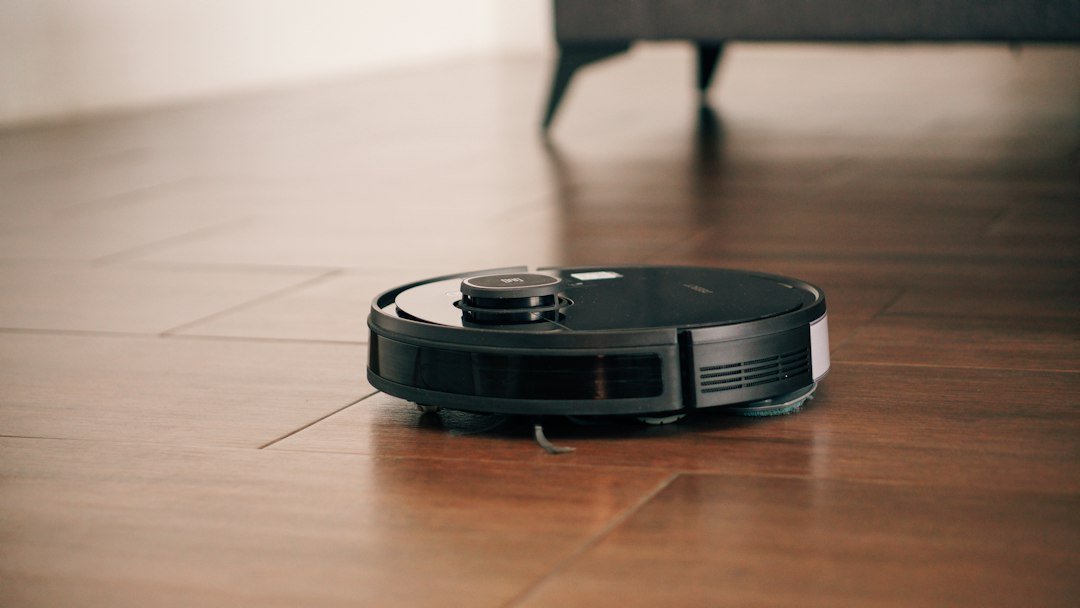
Imagine coming home after a long day, kicking off your shoes, and finding your floors spotless—without ever lifting a finger. That’s the promise of a robot vacuum, the sleek, autonomous gadget that’s quickly becoming a staple in modern households.
In the past few years, robot vacuums have evolved from novelty toys into powerful, AI‑driven cleaning machines capable of tackling hardwood, carpet, tile, and even pet hair. According to market research, global sales of robot vacuum cleaners are projected to exceed $9 billion by 2027, and it’s easy to see why.
In this comprehensive guide, we’ll explore everything you need to know before you click “Add to Cart.” From the core technology that powers these devices to the features that matter most, you’ll walk away with actionable insights that help you choose the perfect robot vacuum for your home and lifestyle.
—
1. How Robot Vacuums Work – The Tech Behind the Clean
1.1 Navigation Systems: Mapping Your Space
A robot vacuum’s ability to clean efficiently hinges on its navigation system. There are three primary types:
| Navigation Type | How It Works | Pros | Cons |
|—————–|————–|——|——|
| Random Bounce | Moves in a zig‑zag pattern, changing direction when it hits obstacles. | Inexpensive, simple. | Misses spots, longer cleaning times. |
| Gyroscope & Infrared | Uses a combination of gyroscope sensors and infrared to detect walls and furniture. | Better coverage than random bounce. | Still prone to inefficiency in larger homes. |
| LiDAR / Structured Light Mapping | Emits laser or light pulses to create a detailed map of the room, then follows optimized cleaning paths. | Precise, fast, works in dark. | Higher price point. |
If you have an open‑plan layout or multiple rooms, a LiDAR‑equipped robot vacuum (think iRobot Roomba i7+, Roborock S7, or Ecovacs Deebot T10) will save you time and guarantee near‑100 % coverage.
1.2 Suction Power & Brush Design
Suction is measured in Pa (pascals) or Air Watts. For most households, a suction range of 1500–2500 Pa (or 30–45 Air Watts) is sufficient to pick up dust, crumbs, and medium‑length pet hair.
Brush types also matter:
- Side‑brushes sweep debris toward the main suction inlet.
- Rubber‑tipped main brushes (often called “soft‑roll” or “dual‑brush”) excel on carpet and reduce hair tangles.
- Combo brushes combine side and main brushes for all‑floor versatility.
- Wi‑Fi (most common) lets you control the device via a smartphone app.
- Bluetooth is typically used for initial setup, then hands off to Wi‑Fi.
- Voice Assistant Compatibility (Amazon Alexa, Google Assistant, Apple Siri) enables hands‑free commands like “Hey Google, start the vacuum.”
- Studio / 1‑Bedroom (up to 1,500 sq ft) – Random‑bounce or basic gyroscope models are often enough.
- 2‑3 Bedrooms (1,500‑2,500 sq ft) – Look for LiDAR mapping and multi‑room navigation.
- Large Homes (2,500+ sq ft) – Choose a robot with auto‑resume, large dustbin capacity, and the ability to store multiple floor maps.
- Roborock S7: Praised for its vibra‑mop technology and strong suction on carpet, but some users note the mop pad can be tricky to replace.
- iRobot Roomba j7+: Loved for its PrecisionVision™ obstacle avoidance (detects cords, pet waste) and self‑empty base, though the price is steep.
- Ecovacs Deebot T10 Omni: Offers a full‑home auto‑empty and auto‑mop solution, but the app can be occasionally laggy.
- Daily Quick Clean – Set a 15‑minute run for high‑traffic zones (kitchen, entryway).
- Weekly Deep Clean – Schedule a longer session for the entire home, preferably when you’re out (the robot works best without foot traffic).
- Night‑Time Cleaning – Many models run quietly enough to clean while you sleep; just check the dB rating (≤ 65 dB is considered quiet).
- Zone Cleaning – Define specific rooms or areas for targeted cleaning (great for spills).
- Carpet Boost – Some models automatically increase suction when they detect carpet; enable this in the app for deeper cleaning.
- Mop Integration – If your robot includes a mop, adjust water flow settings based on floor type to avoid streaks.
- Multi‑Floor Mapping – Save separate maps for each level of your house; you can switch between them with a tap.
When shopping, look for a robot vacuum that offers adjustable suction settings—high for carpets, low for hardwood—to preserve battery life.
1.3 Battery Life & Charging Dock
Most robot vacuums run on lithium‑ion batteries, delivering 90–120 minutes of runtime on a single charge. After cleaning, they automatically return to their dock to recharge. Some premium models feature “auto‑resume”: the robot docks, recharges, then continues cleaning from where it left off—ideal for larger homes.
1.4 Smart Connectivity
A truly modern robot vacuum integrates with your smart home ecosystem:
If you love automation, look for IFTTT or routine support (e.g., start cleaning when you leave home).
—
2. Choosing the Right Robot Vacuum for Your Home
2.1 Identify Your Flooring Mix
| Flooring Type | Recommended Brush | Suction Setting | Suggested Models |
|—————|——————-|—————-|——————|
| Hardwood / Tile | Soft‑roll brush, side‑brushes | Low‑to‑medium | Roborock S7, iRobot Roomba 694 |
| Low‑Pile Carpet | Rubber‑tipped main brush | Medium | Ecovacs Deebot N8 Pro+ |
| High‑Pile Carpet / Area Rugs | Dual‑brush with high suction | High | iRobot Roomba j7+, Neato D9 |
| Pet‑Hair Heavy | Anti‑tangle brush + high suction | High | Roborock S7+, Shark IQ Robot Self‑Empty XL |
2.2 Size of Your Home
2.3 Pets and Allergy Concerns
If you have shedding pets or family members with allergies, prioritize these features:
1. High‑Efficiency Particulate Air (HEPA) Filters – Capture 99.97 % of particles down to 0.3 µm.
2. Anti‑Tangle Brush System – Prevents hair from wrapping around the brush.
3. Self‑Empty Dustbin – Reduces contact with dust and allergens; models like the iRobot Roomba i7+ or Shark IQ Robot Self‑Empty XL can store up to 30 days of debris.
2.4 Budget vs. Premium – What’s Worth the Extra Cost?
| Price Range | Typical Features | Best For |
|————-|——————|———-|
| $150‑$250 | Random navigation, basic app, modest suction | Small spaces, occasional cleaning |
| $250‑$400 | Gyroscope navigation, zone cleaning, moderate suction | Medium homes, pet owners |
| $400‑$800 | LiDAR mapping, multi‑floor memory, self‑empty bin, advanced AI | Large homes, tech enthusiasts, allergy sufferers |
| $800+ | Dual‑camera vision, mop integration, full‑home mapping, premium support | Luxury homes, households needing both vacuum & mop |
Remember: a higher price tag usually translates to longer lifespan, more reliable software updates, and better customer support.
2.5 Real‑World Reviews – What Users Are Saying
Reading a mix of pros and cons helps you set realistic expectations before purchase.
—
3. Maximizing Your Robot Vacuum’s Performance
3.1 Prepare Your Home – Simple Pre‑Cleaning Steps
1. Pick Up Large Objects – Toys, shoes, and loose cords can obstruct the robot.
2. Clear Clutter – A tidy floor lets the robot focus on dust rather than navigating obstacles.
3. Define No‑Go Zones – Use virtual walls (via the app) for areas you don’t want the robot to enter (e.g., a home office with important paperwork).
3.2 Optimize Scheduling
3.3 Maintenance – Keep the Robot Running Like New
| Task | Frequency | How‑to |
|——|———–|——–|
| Empty Dustbin | After each run (or when indicator lights up) | Press release latch, tap out debris. |
| Clean Brush Roll | Weekly | Remove brush, clear hair/tangles with scissors or a brush. |
| Wipe Sensors & Wheels | Every 2‑3 weeks | Use a dry microfiber cloth; avoid liquids. |
| Replace Filters | Every 2‑3 months (or per manufacturer) | Snap‑in HEPA filter; discard according to local regulations. |
| Check Wheels & Side‑Brushes | Monthly | Ensure they spin freely; replace if worn. |
Neglecting maintenance can reduce suction by up to 30 % and cause premature battery wear.
3.4 Advanced Features – Getting the Most Out of Smart Functions
3.5 Troubleshooting Common Issues
| Problem | Likely Cause | Quick Fix |
|———|————–|———–|
| Robot gets stuck repeatedly | Low‑lying furniture or tangled cords | Add virtual wall, move obstacles, or adjust brush height. |
| Suction weakens | Dustbin full or filter clogged | Empty bin, clean/replace filter. |
| Battery drains quickly | Battery aging or dirty wheels | Run a calibration cycle; if issue persists, consider battery replacement. |
| App disconnects | Wi‑Fi interference | Move router closer, switch to 2.4 GHz band, or use a Wi‑Fi extender. |
Most manufacturers provide a self‑diagnostic feature in the app that pinpoints the exact issue.
—
4. Future Trends – What’s Next for Robot Vacuums?
4.1 AI‑Driven Object Recognition
Next‑generation models are integrating computer vision to differentiate between a shoe, a pet toy, and a pet waste spot. This reduces false positives for “no‑go zones” and improves cleaning efficiency.
4.2 Hybrid Vacuum‑Mop Systems
Brands are perfecting the dual‑function design, allowing simultaneous vacuuming and mopping with separate water tanks and intelligent path planning to avoid over‑wetting carpets.
4.3 Subscription Services
Some manufacturers now bundle auto‑delivery of replacement filters, brushes, and even cleaning solutions with a monthly subscription, ensuring your robot stays at peak performance without manual re‑ordering.
4.4 Energy‑Harvesting Docking Stations
Emerging docking stations incorporate solar panels or inductive charging that can top up the robot’s battery while it’s docked, extending overall lifespan and reducing electricity usage.
4.5 Integration with Home Security
Future robot vacuums may double as mobile security cameras, patrolling your home when you’re away and sending alerts if motion is detected. This convergence of cleaning and security could reshape smart‑home ecosystems.
—
Conclusion – Key Takeaways for a Spotless, Smarter Home
1. Understand the technology – Navigation (random vs. LiDAR), suction power, and brush design directly affect cleaning performance.
2. Match the robot to your environment – Consider flooring types, home size, pet hair, and allergy needs before deciding on a price tier.
3. Maintain regularly – Simple weekly upkeep (emptying the bin, cleaning brushes) preserves suction and extends battery life.
4. Leverage smart features – Scheduling, zone cleaning, and voice commands turn a robot vacuum from a novelty into a genuine time‑saver.
5. Stay ahead of the curve – AI vision, hybrid vacuum‑mop functions, and subscription services are shaping the next wave of autonomous floor care.
By selecting a robot vacuum that aligns with your lifestyle and following the actionable tips above, you’ll enjoy cleaner floors, less manual labor, and more time for the things you love.
Ready to make the switch? Dive into the latest robot vacuum reviews, compare specs, and let technology do the dirty work for you.
—
Happy cleaning, and welcome to the future of effortless home care!