
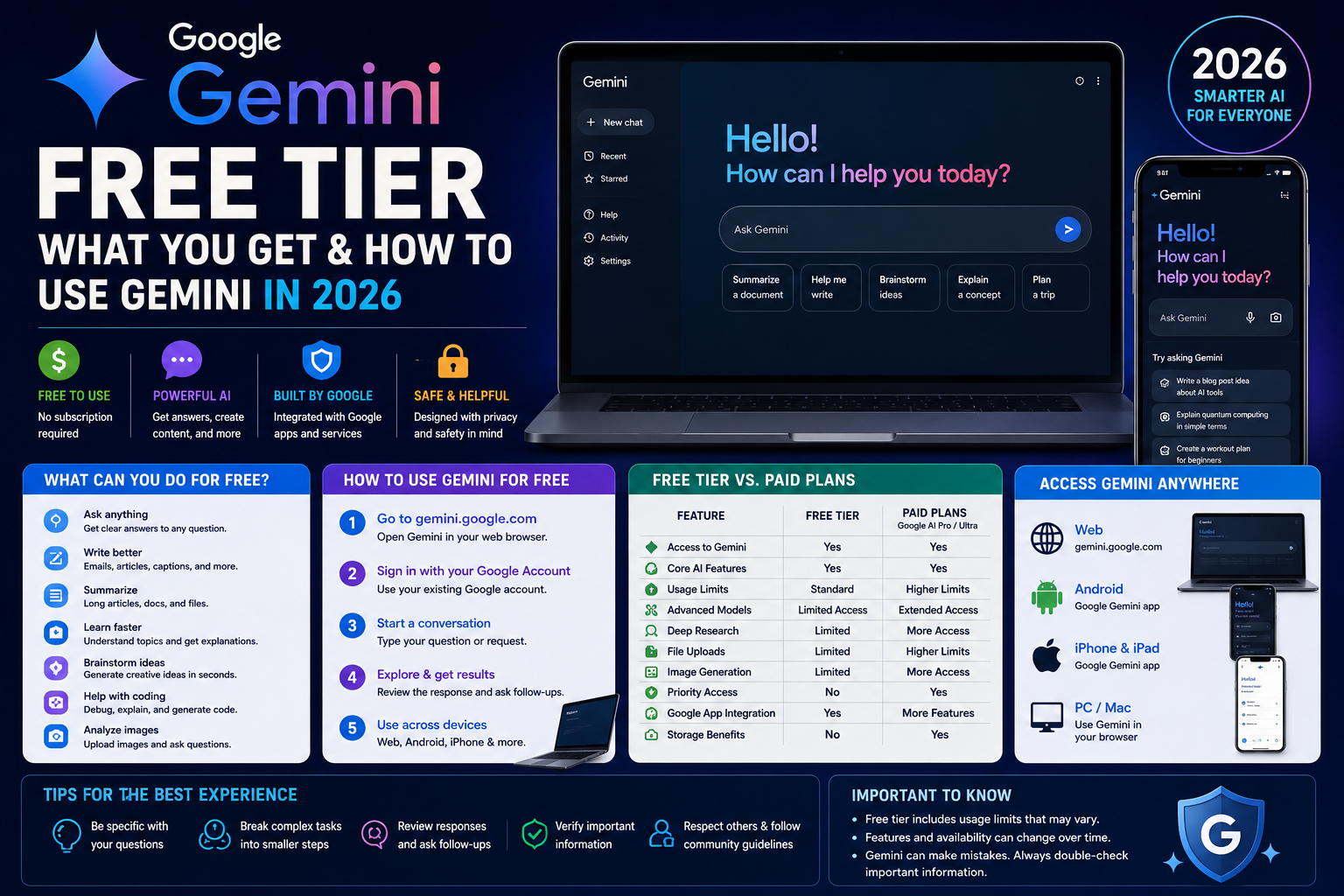
A lot of people search for Gemini’s free tier because the paid plans get most of the marketing attention, and it’s genuinely unclear from the pricing page alone what you actually lose by not paying. The short version: Gemini works without a subscription, using nothing but a standard Google account. Some of the more advanced capabilities and higher usage limits are tied to Google’s paid AI plans, but the free version is a real, usable product rather than a stripped-down demo.
This guide walks through exactly what’s included for free, what requires a paid plan, and how to get the most out of Gemini without spending anything.
What Is Google Gemini?
Gemini is Google’s AI assistant, built into a chat-style interface at gemini.google.com, in dedicated mobile apps, and across several other Google products. You type or speak a request, and Gemini responds with text, and in some cases images, code, or other generated content.
Unlike a traditional search engine, which returns a list of links for you to click through, Gemini generates a direct response based on what you ask, and can hold a back-and-forth conversation, remember context earlier in that conversation, and work with things you upload, like documents or images.
Google has also connected Gemini to several of its other products — Gmail, Docs, Sheets, Drive, Search, Maps, and more — so depending on your settings, it can pull in relevant information from those apps when it’s helpful.
Is Google Gemini Free?
Yes. Gemini is free to use with any standard Google account — the kind you already have if you use Gmail. There’s no credit card required to start, and no trial period that expires.
What you get for free is a real product: text conversations, image generation, document handling, and more, not just a watered-down preview meant to push you toward a subscription. The catch isn’t that features are locked away entirely — it’s that free access comes with daily usage caps, and Google’s most capable models and highest-volume features are reserved for paid Google AI plans.
You may occasionally see prompts to upgrade while using Gemini for free. This usually happens when you’re approaching a usage limit for a specific feature (like image generation or advanced research tools) rather than because the entire product has stopped working.
What Do You Get With Gemini’s Free Tier?
Based on Google’s current documentation and app listings, free users get access to:
- Text conversations — asking questions, getting explanations, and having multi-turn conversations
- Writing help — drafting, rewriting, summarizing, and brainstorming
- Basic image generation — creating images from text prompts, with daily volume limits
- Document and file reading — uploading and asking questions about supported file types directly in the chat window
- Gems — Google’s term for custom, saved chatbot personas you can configure for recurring tasks
- Canvas — an interactive workspace for editing documents, code, or other content alongside the conversation
- Gemini Live — real-time voice conversations, including screen and camera sharing, available on mobile
- Limited Deep Research — Gemini’s tool for researching a topic across multiple sources and compiling a report, available to free users at a lower monthly volume than paid plans
- Basic integration with Google apps — depending on your settings, Gemini can reference relevant information from connected Google services like Gmail, Calendar, or Drive
What’s not included on the free tier: video generation (Google’s Veo models), the deepest Workspace integration, the largest context windows, and the highest usage volumes for research, image generation, and Gemini’s most capable model. Google doesn’t publish one single, fixed number for daily prompt limits — the caps vary by feature and can change, so treat any specific number you see elsewhere with some caution and expect it to shift over time.
Gemini Free vs Google AI Paid Plans
As of 2026, Google’s consumer AI subscriptions sit above the free tier under the “Google AI” branding (these replaced the older “Gemini Advanced” name). Exact pricing and plan names have changed more than once this year, so treat the figures below as a snapshot rather than a guarantee — check Google’s official subscription page for current pricing before deciding.
| Category | Free | Paid Google AI Plans |
|---|---|---|
| Model access | A capable default model with limited daily access to Google’s more advanced model | Expanded or unlimited access to Google’s most advanced models |
| Usage limits | Daily caps on prompts, image generation, and research features | Meaningfully higher limits (Google has described paid tiers as multiples of the free allotment) |
| Deep Research | Limited monthly reports | Higher monthly allowance |
| Image generation | Included, with daily volume limits | Higher limits, and access to more advanced generation tools |
| Video generation | Not included | Available on paid plans |
| Google Workspace integration | Basic | Deeper, more consistent integration across Gmail, Docs, Sheets, and more |
| Storage (Google One) | A baseline amount of free Google account storage | Meaningfully more storage bundled into the subscription |
| Context window | Smaller | Larger, allowing longer documents and conversations |
| Priority access | Standard | Priority access to new features as they roll out |
Google currently offers more than one paid tier (a lower-cost entry plan and higher-cost “Pro” and “Ultra” tiers), each stepping up usage limits and model access further. Because pricing and tier names have shifted multiple times in 2026 alone, the most reliable source for current numbers is Google’s own subscription page rather than any third-party guide, including this one.
How to Use Gemini for Free
On the web:
- Go to gemini.google.com in your browser.
- Sign in with your Google account if you’re not already signed in.
- Type a question or request into the chat box and press enter.
- Review Gemini’s response — you can ask follow-up questions in the same conversation for added context.
- Upload a file or image using the attachment option if you want Gemini to analyze it.
- Start a new conversation anytime using the “new chat” option to begin with a clean context.
- Access past conversations and manage your settings, including activity and privacy controls, from the menu.
On mobile: the process is nearly identical — open the app, sign in with the same Google account, and start typing or tap the microphone icon to talk to Gemini Live.
How to Use Gemini for Everyday Tasks
Writing Gemini can help draft emails, brainstorm blog post ideas, rewrite awkward sentences, summarize long articles, or generate a first draft you edit yourself.
Learning Ask Gemini to explain a difficult concept in simpler terms, generate practice questions on a topic you’re studying, summarize your notes, or walk through a problem step by step.
Work Use Gemini to organize scattered information into a clear structure, draft a first version of a document, brainstorm approaches to a project, or ask questions about a file you’ve uploaded.
Coding Gemini can explain what a piece of code does, help identify why something isn’t working, generate example code for a concept you’re learning, or explain a programming concept in plain language. As with any AI tool, double-check anything before relying on it in production code.
Planning Ask Gemini to help outline a trip itinerary, compare options for a purchase, break a larger project into steps, or organize your day.
Gemini, like any AI system, can make mistakes — including confidently stating something incorrect. Treat its answers as a helpful starting point rather than a guaranteed-accurate source, especially for anything factual, medical, legal, or financial.
Gemini for Images and Files
Free users can generate basic images from text prompts, though Google limits how many you can create per day. The exact cap isn’t published as a fixed number and can vary, but multiple sources describe it as a genuine, usable feature rather than a token preview.
For files, you can upload common document types directly into a conversation and ask Gemini questions about the content, have it summarize the file, or pull specific information from it. There are limits on file size and how much content Gemini can process in a single conversation (tied to its context window), and the free tier’s context window is smaller than what paid plans offer — so very long documents may need to be broken into sections.
Image generation and file analysis are both included on the free tier, but neither is unlimited, and Google has not published one universal number that applies to every account and region.
Gemini on Android, iPhone, and PC
| Platform | How to Access | Notes |
|---|---|---|
| Android | Official Gemini app via Google Play, or through Google Assistant integration on supported devices | Opting into the Gemini app replaces Google Assistant as your default assistant; you can switch back in settings |
| iPhone/iPad | Official Gemini app via the Apple App Store | Requires a reasonably current iOS version; some device-level actions (like setting alarms) aren’t supported the way they are on Android |
| Windows PC | Web browser at gemini.google.com | No dedicated Windows desktop app; the web version is the official method |
| Mac | Web browser at gemini.google.com | Same as Windows — use the web version rather than a third-party desktop wrapper |
| Web browser | gemini.google.com, on any modern browser | Works on both desktop and mobile browsers |
For PC and Mac, stick to the official web app rather than downloading any third-party “Gemini desktop client” — Google does not currently offer one, and unofficial software claiming to be a Gemini desktop app should be treated with suspicion.
Is There a Gemini App?
Yes — Google publishes official Gemini apps for both Android (via Google Play) and iOS (via the Apple App Store). Both are free to download, and free-tier usage limits apply the same way they do on the web version.
To keep the app updated, use your device’s normal app store update process rather than manually downloading files. Avoid installing Gemini through APK files from third-party websites; while some of these claim to mirror the official app, downloading an APK from an unverified source carries real security risk, and there’s no reliable way for an average user to confirm it hasn’t been modified. Google Play and the App Store remain the safest, official installation paths.
Gemini Free Tier Limitations
The free tier is genuinely useful, but it’s worth understanding where it stops:
- Usage caps apply to prompts, image generation, and research features, and reset on a rolling basis rather than a fixed calendar date in most cases
- Model access favors Google’s faster, more efficient default model, with only limited daily access to its more advanced model
- Video generation isn’t included at all on the free tier
- File and context limits are smaller than on paid plans, meaning very long documents or conversations may hit a ceiling sooner
- Regional availability can vary — some features and even the app itself aren’t available in every country
- Limits can change — Google adjusts free-tier quotas periodically based on demand and product changes, so what’s true today may shift
If you regularly hit a wall with any of these, that’s usually the clearest sign a paid plan would make a practical difference for how you use it.
Is Gemini Free Really Good Enough?
For a lot of people, yes. Casual users, students doing everyday coursework, people writing occasional emails or blog posts, and anyone dipping a toe into AI tools for the first time will likely find the free tier covers what they need most of the time.
Where the free tier starts to feel limiting: heavy daily users who run into caps regularly, developers who need the API’s higher-volume options, professionals relying on Gemini for demanding daily work, and anyone who specifically needs video generation, deep Workspace integration, or the largest context windows. In those cases, a paid plan solves a real, specific problem rather than just unlocking marketing checkboxes.
There’s no single right answer here — it depends entirely on how often you use it and for what.
Gemini Privacy and Safety
A few practical things worth knowing:
- Avoid entering sensitive personal or confidential information. Google has stated that some conversations may be reviewed by human reviewers to improve the service, and conversations can be retained even after you delete them from your visible activity, depending on your settings.
- Review your privacy settings. You can manage and turn off Gemini Apps Activity, and adjust auto-delete settings for your conversation history, through your Google account’s activity controls.
- Gemini can make mistakes. Treat its responses, especially factual claims, as something to verify rather than accept outright — this is true of every current AI assistant, not unique to Gemini.
- Be cautious with uploaded files. Anything you upload is processed by Google’s systems; avoid uploading documents containing information you wouldn’t want stored or reviewed.
- Work or school accounts follow different rules. If you access Gemini through a Workspace account tied to your employer or school, data handling may differ from a personal account — check with your organization if you’re unsure.
Gemini isn’t uniquely risky compared to other mainstream AI assistants, but it isn’t fully private either. Treat it the way you’d treat any cloud-connected AI tool.
Common Gemini Problems and Fixes
Gemini isn’t responding or seems stuck Refresh the page or restart the app, and check your internet connection. If the issue persists, it may be a temporary outage rather than an account problem.
“You’ve reached your limit” message This means you’ve hit a daily cap for that specific feature (often image generation or Deep Research). Limits typically reset on a rolling schedule, so trying again later usually resolves it.
A feature isn’t available Some features roll out gradually by region, account type, or device. If something you’ve read about isn’t showing up, it may not have reached your account or country yet.
App won’t open or keeps crashing Make sure you’re running the latest version from Google Play or the App Store, restart your device, and reinstall if the problem continues.
Login problems Confirm you’re signing in with the correct Google account, and check whether your organization (if using a work or school account) has restricted Gemini access.
Gemini isn’t available in your region Availability varies by country for both the app and specific features. There’s no reliable, safe workaround for this — it depends on Google’s own rollout schedule.
File upload doesn’t work Check that the file type and size are within supported limits; very large or unsupported file formats may fail silently or return an error.
Responses seem inaccurate This happens with any AI system. Cross-check anything important, especially specific facts, numbers, or claims, against a reliable source.
Gemini keeps prompting you to upgrade This is usually tied to hitting a specific feature’s usage cap, not an indication that free access has ended entirely.
Gemini vs ChatGPT Free
| Category | Gemini (Free) | ChatGPT (Free) |
|---|---|---|
| General AI assistance | Strong, with everyday conversation and task support | Strong, similar general capability |
| Writing | Capable for drafting, summarizing, and brainstorming | Capable, broadly comparable |
| Coding | Useful for explanations and examples | Useful for explanations and examples |
| Research | Limited Deep Research included free | Comparable research-style features vary by version available |
| Google ecosystem integration | Strong — connects with Gmail, Docs, Drive, and more | Not applicable — no native Google integration |
| File/image capabilities | Document upload and basic image generation included | Document upload and image generation also included, with its own limits |
| Free access | No credit card required, ongoing free tier | No credit card required, ongoing free tier |
| Ease of use | Straightforward, especially for existing Google users | Straightforward, similarly beginner-friendly |
| Best use case | Users already embedded in Google’s apps and services | Users without a strong preference for either ecosystem |
Neither tool is universally better — the more useful comparison is usually about which ecosystem you’re already using day to day, since both offer comparable free-tier core functionality and change their limits frequently.
Frequently Asked Questions
Is Gemini free to use? Yes, with any standard Google account and no credit card required.
Is Gemini free on Android? Yes, the official Gemini app is free to download from Google Play, with the same free-tier usage limits as the web version.
Is Gemini free on iPhone? Yes, the official Gemini app is free on the Apple App Store.
Can I use Gemini without Google AI Pro? Yes. Google AI Pro (and the other paid tiers) add expanded access and higher limits, but they aren’t required to use Gemini.
What can Gemini do for free? Text conversations, writing assistance, basic image generation, document analysis, Gems, Canvas, Gemini Live voice, and limited Deep Research.
Does Gemini have usage limits? Yes. Free accounts have daily caps on prompts and specific features like image generation and research, though Google doesn’t publish one universal number.
Is Gemini better than ChatGPT? Neither is universally better — it depends on your needs and which ecosystem you’re already using. Both offer strong free tiers with broadly comparable core features.
Can Gemini generate images for free? Yes, with daily volume limits.
Can I upload files to Gemini for free? Yes, for common file types, subject to file size and context window limits.
Can I use Gemini on a PC? Yes, through the web browser at gemini.google.com — there’s no separate Windows or Mac desktop app.
Why is Gemini asking me to upgrade? Usually because you’ve reached a usage cap for a specific feature, not because your account has lost free access entirely.
Is Gemini safe to use? It’s reasonably safe for everyday use, but avoid sharing sensitive personal or confidential information, and review Google’s privacy settings if you want more control over how your data is used and retained.
Final Verdict
Gemini’s free tier is genuinely worth using in 2026 for most casual and moderate users — it’s a real, capable product rather than a limited trial, and it covers writing, everyday questions, basic image generation, and document help without requiring payment. Where it makes sense to consider a paid plan is if you’re regularly hitting daily limits, need Google’s most advanced model consistently, want video generation, or rely on deep integration with the rest of your Google Workspace. For everyone else, especially students, casual writers, and people exploring what AI tools can do, the free tier is a sensible place to start.