
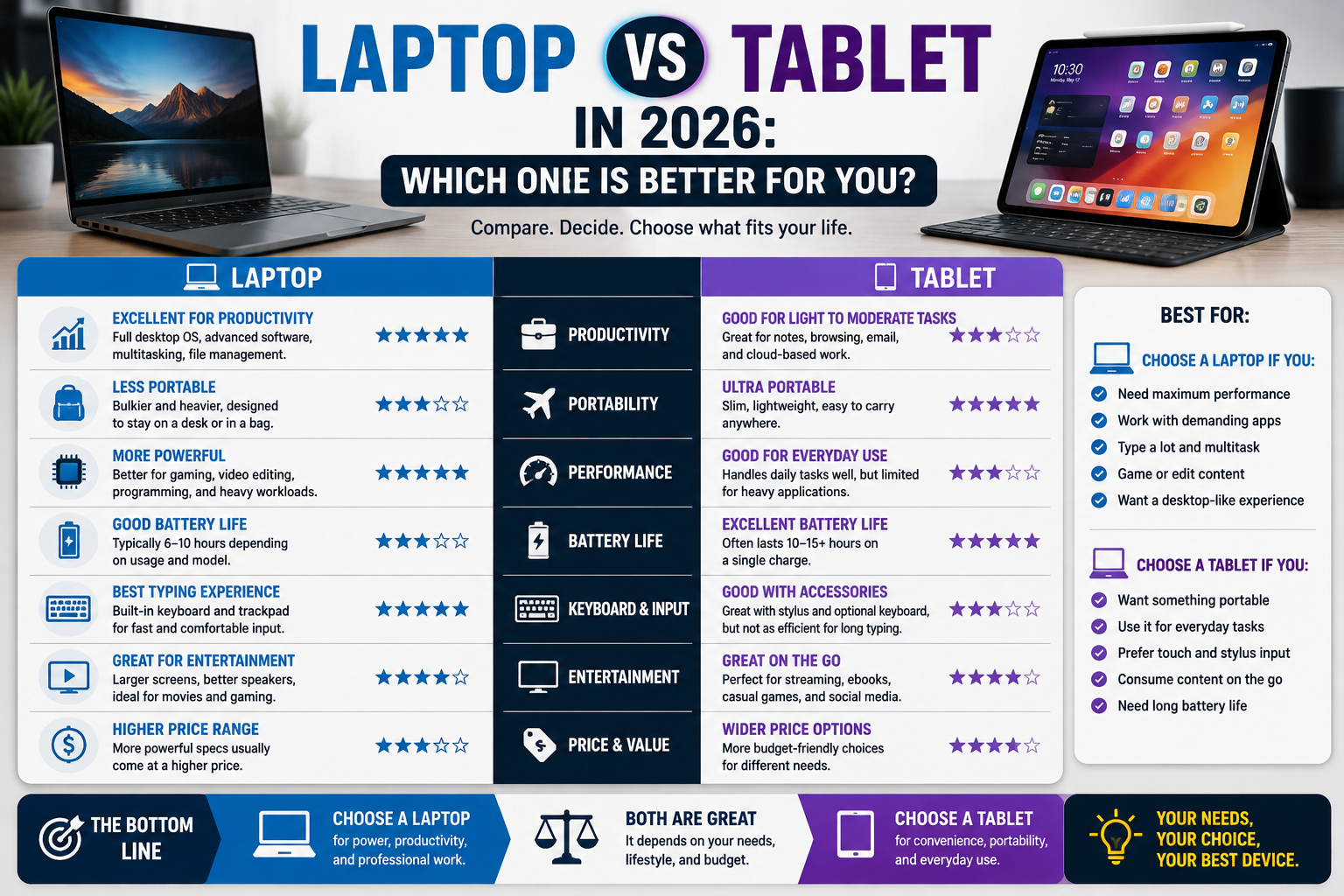
The modern computing landscape offers powerful choices for mobile productivity, media consumption, and creative work. As portable processors grow increasingly efficient and operating systems evolve, the traditional boundary between mobile platforms and desktop environments has blurred significantly. Choosing between a traditional laptop and a versatile tablet in 2026 can therefore feel challenging.
The right choice does not depend on which device category is universally superior. Instead, the ideal device depends entirely on your personal workflow, software requirements, physical preferences, and daily habits. This guide breaks down how laptops and tablets compare across key performance, comfort, and utility metrics to help you make an informed decision.
1. Laptop vs Tablet at a Glance
| Category | Laptop | Tablet | Better For |
| Portability | Good, slightly bulkier with fixed hinges | Excellent, thin and lightweight | Tablets for ultra-mobile reading/travel |
| Performance | High sustained power and cooling headroom | Highly efficient, compact power | Laptops for heavy computing workloads |
| Keyboard use | Integrated, comfortable, mechanical stability | Detachable or virtual (requires accessories) | Laptops for heavy document creation |
| Touchscreen | Optional/Convertible | Standard feature | Tablets and 2-in-1s for intuitive navigation |
| Battery | Varies by chassis size and power draw | Excellent standby and efficient media playback | Tablets for long media consumption |
| Multitasking | Robust window management and split screens | App-switching and split-view windows | Laptops for complex multi-window workflows |
| Software | Full desktop applications and file systems | Mobile apps, web apps, and sandboxed files | Laptops for professional development software |
| Gaming | Supports complex PC games and emulators | Mobile games, cloud gaming, casual titles | Laptops for traditional PC gaming |
| Productivity | Comprehensive file management and peripherals | Great for notes, reading, and mobile tasks | Laptops for deep professional productivity |
| Entertainment | Excellent for movies with built-in stands | Exceptional for handheld viewing and streaming | Tablets for casual media consumption |
| Accessories | Mouse and external monitor integration | Stylus support and folio cases | Varies based on creative needs |
| Storage | Large upgradeable or high-capacity options | Fixed internal storage plus cloud/external | Laptops for massive local file archives |
| Connectivity | Extensive physical ports (USB-A, HDMI, etc.) | Primarily USB-C, wireless, cellular options | Laptops for legacy peripheral support |
| Long-term use | Easier hardware maintenance and longevity | Sealed units with lifespan tied to OS support | Laptops for multi-year upgrade flexibility |
2. Portability
Portability is about more than just numbers on a scale. While tablets are universally celebrated for being thin, light, and easy to slip into a small bag, laptops have narrowed the gap with ultra-slim designs.
For students, commuters, and frequent travelers, actual portability depends on the total ecosystem. A tablet with a thin folio keyboard cover often forms a lighter package than a traditional clamshell laptop. However, if you factor in the charging bricks, external mice, and stands required to make a tablet function like a workstation, the weight advantage can diminish. Laptops offer a self-contained unit with a rigid hinge that can easily rest on a lap or a small tray table, whereas standard tablets often require a flat surface or kickstand to support external keyboards.
For deeper insights into mobile form factors, check out our [Internal Link: Buying Guides] and [Internal Link: Laptops].
3. Performance
Hardware architecture dictates how these devices handle computing tasks. Laptops generally house larger processors and active cooling solutions (such as fans), allowing them to sustain high processing loads over extended periods without thermal throttling. This makes laptops well-suited for video rendering, code compilation, and running complex data spreadsheets.
Tablets typically rely on passive, fanless cooling designs. While modern mobile chipsets deliver incredible burst speeds and efficiency, prolonged heavy workloads can cause thermal throttling as heat builds up in a thin chassis. For quick edits, sketching, media consumption, and responsive web browsing, tablet processors feel remarkably snappy. However, heavy professional applications that require sustained multi-core utilization still favor traditional laptop architectures.
4. Keyboard and Productivity
The input method remains one of the defining differences between the two categories. Laptops feature built-in, mechanically stable keyboards with physical key travel and integrated trackpads designed for precise cursor control. This makes writing long documents, managing spreadsheets, and writing code significantly more comfortable out of the box.
Tablets rely primarily on touchscreens, though many users pair them with detachable folio keyboards or Bluetooth peripherals. While modern tablet keyboards have improved dramatically, they often feature shallower key travel due to space constraints. Furthermore, navigating dense spreadsheets or precision editing timelines with a touchscreen or small trackpad can feel less efficient than using a standard laptop trackpad or mouse.
5. Software and Operating Systems
Software ecosystems shape what you can accomplish on each device. Traditional laptops run desktop operating systems that support deep file management, legacy applications, multiple overlapping windows, and unrestricted software installation from any source.
Tablets generally run mobile-first operating systems or streamlined desktop environments designed around app sandboxing, touch interfaces, and cloud storage. While mobile apps have grown remarkably powerful—handling photo editing, video trimming, and document markup with ease—certain professional applications, specialized databases, and legacy software packages simply do not have mobile equivalents. If your workflow depends on specific desktop software, a laptop is typically mandatory.
6. Gaming
Gaming preferences dictate which form factor makes sense. Laptops—particularly those designed with dedicated graphics processors—support full PC gaming libraries, expansive modding communities, high refresh rate displays, and complex peripheral setups.
Tablets excel at casual mobile gaming, cloud streaming services, and touch-based puzzle or strategy games. With Bluetooth controller support, a tablet can easily double as a portable cloud-gaming screen. However, if your goal is to play demanding modern PC games natively with high graphical fidelity, a gaming laptop or desktop is necessary.
7. Battery Life
Battery longevity varies based on how components draw power under load. Tablets benefit from highly power-efficient mobile processors and optimized operating systems, often delivering excellent standby time and long hours of media streaming or reading.
Laptops span a wide spectrum; ultra-low-power productivity laptops can easily last through a full workday of web browsing, while high-performance laptops handling gaming or video rendering will drain their batteries rapidly. In both device categories, high screen brightness, heavy processor workloads, and active cellular or Wi-Fi connections significantly reduce real-world runtime.
8. Display and Entertainment
Both devices serve as exceptional entertainment hubs, but they cater to different environments. Tablets shine as portable screens for watching movies in bed, reading digital books, browsing recipes in the kitchen, or sketching with a stylus. Their touchscreens invite intuitive interaction.
Laptops provide larger screen real estate, making them comfortable for split-screen multitasking, viewing sprawling spreadsheets, or watching movies on a desk or flight tray table. When considering display quality—such as high resolution, vibrant panel technology, and smooth refresh rates—both categories offer premium options, though high-end tablets frequently feature exceptional OLED panels tailored for mobile media consumption.
For recommendations on top-tier display devices, explore our [Internal Link: Best Picks] and [Internal Link: Comparisons].
9. Accessories
Accessories can transform how a device functions, but they also impact total cost and convenience. Tablets often require purchasing a separate keyboard case and active stylus to unlock their full productivity potential, which can raise the initial investment.
Laptops generally include everything required for typing and cursor navigation built directly into the chassis. However, both laptops and tablets benefit from external accessories like docking stations, external monitors, mice, and backup drives. Evaluating what accessories you need ahead of time helps prevent unexpected expenses.
10. Storage and Connectivity
Storage management and physical connectivity differ fundamentally between the two form factors. Laptops usually offer substantial internal solid-state storage capacity, along with physical ports such as USB-A, USB-C, HDMI, and SD card slots, allowing you to connect legacy hardware without adapters.
Tablets lean heavily toward cloud storage and streamlined USB-C ports. While external drives can be connected to most modern tablets via USB-C or wireless protocols, the lack of legacy ports often necessitates USB hubs or dongles. Some tablets offer optional cellular (LTE/5G) connectivity, providing mobile data independence that most standard laptops lack without tethering to a phone.
11. Laptop vs Tablet for Different Users
- Students: Either device can work well, depending on the field of study. Humanities students who primarily read, take handwritten notes, and write papers may prefer a tablet with a stylus and keyboard. STEM students requiring specialized software or programming tools will need a laptop.
- Office Workers: Laptops remain the standard choice for general office administration, heavy spreadsheet work, and corporate software integration.
- Writers: Laptops provide superior keyboard ergonomics and stable lap-ability for long typing sessions.
- Artists & Illustrators: Tablets paired with a pressure-sensitive stylus offer an unmatched digital canvas for drawing and photo touch-ups.
- Designers: Often use tablets for concept sketching, but rely on powerful laptops or desktops for final rendering and vector work.
- Programmers: Strongly benefit from laptops due to full operating system access, multiple terminal windows, and local development environments.
- Travelers: Frequent travelers often prefer lightweight tablets for entertainment and light email, or ultra-portable laptops if full work capabilities are required on the road.
- Casual Users: Casual web browsers, shoppers, and media watchers often find tablets simpler, faster to wake up, and more comfortable.
- Gamers: PC gamers require laptops, while casual mobile gamers are well-served by tablets.
- Content Consumers: Tablets win easily for effortless streaming, reading, and couch browsing.
For help finding specific mobile devices or peripherals, visit our [Internal Link: Phones] and [Internal Link: Accessories] sections.
12. When a Tablet Is the Better Choice
A tablet is preferable when your primary activities involve media consumption, reading, handwritten note-taking, sketching, digital art, casual web browsing, and traveling light. If you value instant-on responsiveness, touch navigation, and portrait-mode reading capabilities, a tablet provides an experience that traditional laptops cannot replicate.
13. When a Laptop Is the Better Choice
A laptop is essential when your daily routine requires heavy typing on a stable mechanical keyboard, complex multitasking across multiple visible windows, running full desktop software suites, connecting to legacy peripherals via standard ports, and managing large local file archives without relying on cloud infrastructure.
14. Can a Tablet Replace a Laptop?
For some users, yes; for others, absolutely not. Whether a tablet can serve as your sole computing device depends entirely on your software demands. If your daily digital life lives inside web browsers, cloud documents, and streaming apps, a tablet with a keyboard case can easily replace a traditional laptop. However, if your work involves specialized desktop applications, deep file system manipulation, or complex programming environments, a tablet will quickly feel restrictive.
15. Common Buying Mistakes
- Buying based only on screen size: Ignoring operating system capabilities and software compatibility.
- Ignoring software requirements: Assuming a mobile app store can substitute for required desktop programs.
- Forgetting keyboard costs: Failing to budget for necessary tablet keyboard accessories.
- Ignoring ports: Overlooking the need for physical HDMI or USB-A connections.
- Buying more performance than necessary: Paying for high-end workstation hardware for basic web browsing.
- Choosing too little storage: Selecting base-model storage capacities that fill up quickly with local media or apps.
- Ignoring long-term update support: Failing to check manufacturer software update lifecycles.
- Assuming a tablet runs every desktop application: Expecting full desktop productivity workflows on mobile operating systems.
16. Decision Checklist
- Choose a laptop if: You need a physical keyboard, full desktop software, extensive file management, and robust multitasking power.
- Choose a tablet if: You prioritize touch navigation, stylus support, portability, media streaming, and casual reading.
- Either could work if: Your daily computing needs are limited to web browsing, email, video calls, and document viewing.
FAQ
- Q: Can I connect a mouse and keyboard to a tablet?
- A: Yes, almost all modern tablets support Bluetooth and USB-C mice and keyboards.
- Q: Do tablets need a screen protector?
- A: While modern glass is durable, a screen protector can protect against scratches, and textured protectors improve stylus friction for drawing.
- Q: Are laptops better for multitasking?
- A: Generally yes, as desktop operating systems allow flexible, overlapping window management that is easier to organize across screens.
- Q: Can a tablet replace a laptop for university?
- A: It depends on your major. Arts and humanities students often succeed with tablets, while engineering and computer science students require laptops.
- Q: Which device lasts longer on a single charge?
- A: Tablets generally offer superior standby efficiency and long media playback runtimes compared to average productivity laptops.
- Q: Is mobile storage as fast as laptop storage?
- A: High-end tablets use extremely fast flash storage, but laptops often feature larger capacity pools and faster sustained transfer rates for large files.
- Q: Do tablets support external monitors?
- A: Many modern tablets support external display mirroring or extended desktop modes via USB-C, though laptop multi-monitor support remains more versatile.
Final Verdict
Deciding between a laptop and a tablet does not come down to declaring one category a universal winner. Instead, success lies in aligning your purchase with your actual digital habits.
If your daily routine revolves around typing documents, managing complex files, running professional desktop software, and utilizing legacy peripherals, a laptop remains the indispensable tool of choice. If your lifestyle leans toward mobility, digital artistry, reading, streaming, and touch-first navigation, a tablet offers unmatched convenience and versatility. Assess your workflow honestly, evaluate the software you truly need, and choose the device that supports your daily tasks without unnecessary friction.
TrueAction – A detailed comparison covering typing comfort, multitasking, file management, port availability, and real total cost once you factor in keyboard accessories, plus who each device format actually suits. Click here to open the guide.
Vision Computers – A business-oriented buying guide breaking down laptop vs. tablet by use case (accounting software, CRM work, point-of-sale, field work), with specific guidance for different buyer profiles and budgets. Click here to open the guide.
Refab – A student-focused comparison looking at coursework type, typing-heavy assignments vs. stylus note-taking, and when a Chromebook or tablet-plus-keyboard setup is enough versus when a full laptop is necessary. Click here to open the guide.
ComputerShop.EU – A straightforward breakdown of the core distinction between the two categories — productivity versus mobility and content consumption — aimed at readers choosing between the two for work, school, or personal use. Click here to open the guide.